
Our readers keep the lights on and the coffee maker working hard! As an Amazon Associate, I earn from qualifying purchases.
Specs are compiled from manufacturer listings and verified buyer reviews and can change over time — please confirm the key details on the product page before buying.
A work headset lives or dies by two things: whether your voice cuts through the hum of an open office, and whether you still want to wear the thing after four back-to-back calls. This guide covers nine headsets, from a 35-gram bone-conduction model to a wireless headset with a self-charging dock.
I’m Mohammad — the founder and writer behind Calories Fit. This guide is built by comparing the manufacturers’ published specifications and the patterns across verified customer reviews, so you get each pick’s real strengths and trade-offs instead of marketing spin.
These nine headsets handle everything from quiet home offices to noisy coffee shops. Here is the full breakdown of the best work headset with microphone options available right now.
Our Picks at a Glance


How To Choose The Best Work Headset With Microphone
Choosing a work headset means matching connection type, noise cancellation, and battery life to your daily routine.
Wired vs. Wireless: Which connection fits your day?
A wired headset (like the Poly Blackwire 3220) plugs directly into your PC via USB-C or USB-A, offering an instant plug-and-play connection with no battery anxiety. A wireless headset (like the AOC with Bluetooth 5.4) frees you to walk to a printer or grab coffee mid-call, but you will need to keep an eye on the battery gauge.
Noise cancellation: For your callers, not just for you
A microphone with noise cancellation filters out the background chaos — the barking dog, the office chatter — so the person on the other end only hears your voice. That is different from passive noise cancellation on the ear cups, which muffles sound for your ears. For work calls, a noise-canceling mic is the priority.
Battery life: How long until you charge again?
If you go wireless, look for a talk time number that spans your longest days. A headset with 30 to 40 hours of talk time, like the AOC models or the Jabra Evolve2 65, can last a full work week on one charge. Fast charging is a bonus — the SHOKZ gives you 2 hours of talk time from a 5-minute charge.
Quick Comparison
| Model | Best For | Connection | Talk Time | Mic Type | Amazon |
|---|---|---|---|---|---|
| AOC Wireless Headset★ Best Overall | Best Overall / Desk Freedom | Bluetooth 5.4 + USB Dongle + 3.5mm | 40 Hours | AI Noise Canceling | Amazon |
| SHOKZ OpenComm2 UCOpen Ear Innovation | Open-Ear Awareness | Bluetooth 5.1 + USB-C Dongle | 16 Hours (Talk) | Noise-Canceling Boom (DSP) | Amazon |
| Jabra Evolve2 65 MSPremium Wireless | Premium All-Day Wireless | Bluetooth 4.2 + Link380 Dongle | 37 Hours | 3-Mic Technology | Amazon |
| Logitech Zone Wired | Open Office / Teams Calls | USB-C + USB-A Adapter | — | Noise-Canceling Dual Mic | Amazon |
| Poly Blackwire 5220 | Multi-Device Wired Flexibility | USB-C + USB-A 3.5mm | — | Noise-Canceling Boom Mic | Amazon |
| EPOS Sennheiser SC 30 USB ML | Lightweight Single-Ear | USB | — | Noise-Cancelling | Amazon |
| AOC V5.3 Wireless Headset | Budget Wireless Value | Bluetooth 5.3 + USB Dongle + 3.5mm | 30 Hours | AI Noise Cancellation | Amazon |
| Yealink UH34 USB Headset | Ultra-Light Budget Wired | USB-A | — | Noise Cancelling | Amazon |
| Poly Blackwire 3220 Wired | Budget Friendly Wired | USB-C + USB-A Adapter | — | Noise-Canceling Boom Mic | Amazon |
In‑Depth Reviews
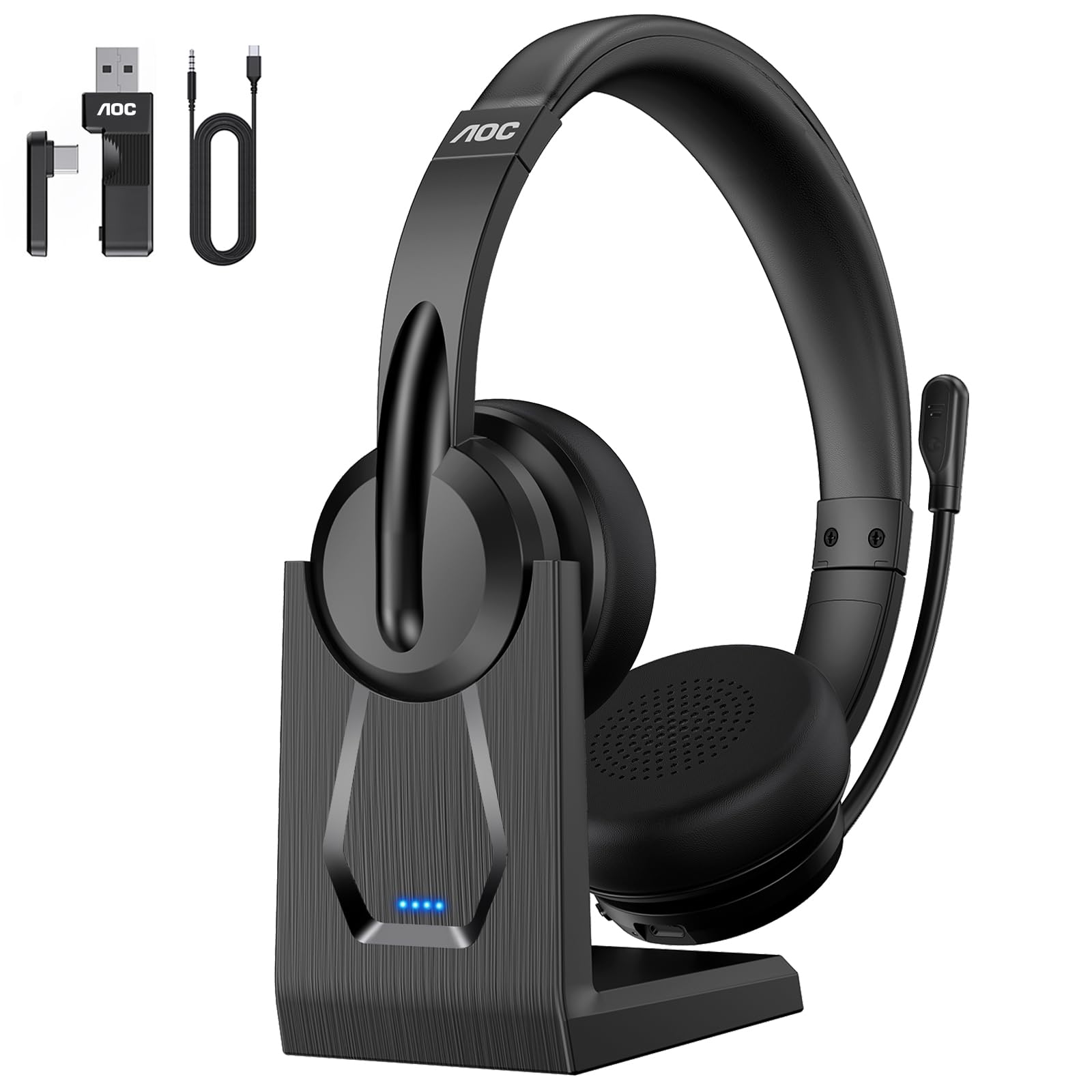
1. AOC Wireless Headset with Mic for Work, Bluetooth 5.4
Our pick — over 4.5★ from 750+ verified ratings; the strongest balance of quality and price.
The wireless headset that practically charges itself and handles a full week of calls on a single fill-up.
The standout feature here is the charging base — you just dock the headset when you step away, and it powers up without fiddling with cables. That convenience pairs with 40 hours of talk time, so the battery is the last thing you worry about during a heavy call day. The Bluetooth 5.4 connection, combined with a USB A/C dongle and a 3.5mm wired option, means you can switch between a laptop, PC, and phone without missing a beat.
The AI noise-canceling mic is designed to suppress background distractions in busy environments, so your voice stays the dominant audio on the call. At just over 5 inches on-ear, the adjustable headband and soft ear cushions aim for all-day comfort. The rotate-to-mute function on the mic boom gives you instant privacy control. It also offers a higher 40 hours of talk time compared to the 30 hours on the AOC V5.3 model below.
Owners praise the battery life and charging dock for reliable all-day use. — owners note that the battery holds up through long workdays without needing a top-up, and the dock makes midday charging easy. An occasional note is that the ear cushions, while comfortable, may feel snug for heads on the larger side. The crowd consensus is that this is the best-balanced wireless option for anyone who values convenience and clear audio.
Reasons It Leads the List
- Included charging base keeps the desk tidy and the battery topped up between calls
- 40 hours of talk time outlasts most work weeks on a single charge
- AI noise cancellation on the mic cuts out background chatter for clearer conversations
The Trade-Offs to Know
- On-ear fit might feel snug for those with larger head shapes over long periods
- AI noise cancellation feature is only active in Bluetooth mode, not when using the wired cable
Ideal for: Anyone juggling calls across multiple devices who wants a wireless headset that charges easily and lasts a whole work week.
Consider another if: You prefer an over-ear fit that completely encloses your ears for maximum passive noise isolation.
2. SHOKZ OpenComm2 UC 2025 Upgrade – Open-Ear Wireless Computer Headset
A 35-gram headset that delivers voice clarity through your cheekbones, leaving your ears completely free.
The defining trait of this headset is bone conduction technology — 7th generation Shokz technology that transmits sound through the bones of your skull, so your ear canals stay open. That means you hear your surroundings naturally while taking calls, a critical advantage for those who need situational awareness or simply find in-ear and on-ear headsets fatiguing after hours of wear. The IP55 water-resistant silicone finish adds durability for a mobile work lifestyle.
It includes a noise-canceling boom microphone with DSP technology that focuses on your voice while dialing down background noise. The Shokz Loop120 wireless adapter plugs into a USB-C port on your PC or Mac for a stable connection, and it is Zoom-Certified. On battery, you get 16 hours of talk time and 8 hours of listening time per charge, with a 5-minute quick charge that provides 2 hours of talk time — a real lifesaver when you forget to charge overnight.
The thing everyone raves about is the all-day comfort — at 35g, it is extremely lightweight, and the open-ear design prevents the soreness that plagues traditional headsets. Some owners do note that the temples can feel sore after extended use, and the sound quality for music is less rich than something like the Jabra Evolve2 65. The microphone noise cancellation is praised by owners for making their voice stand out clearly, even in noisy environments like a call center.
Best suited for: Call center workers, remote professionals, or anyone who wears a headset all day and wants to remain aware of their environment.
A fair warning: The audio quality for music and media is thinner than traditional over-ear headsets — this is a tool for calls, not a music-first device.
3. Jabra Evolve2 65 MS Wireless Headphones with Link380a
A premium wireless headset that packs 37 hours of battery life and a mic that makes your voice sound like you are in the room.
The Jabra Evolve2 65 is the go-to for professionals who spend the entire day on calls and need a headset that disappears on their head. The enhanced memory foam padding and angled design provide passive noise cancellation that, according to Jabra, cancels 48% more ambient noise than previous models. The 40mm speakers deliver rich, high-definition audio for both calls and music, while the 3-microphone call technology filters out background conversation noise during calls.
With 37 hours of battery life on a single charge, this headset can easily last a full work week. A 15-minute charge provides up to 8 hours of use — a fast top-up for busy mornings. It is tune for Microsoft Teams and comes with the Jabra Link 380a USB-A Bluetooth adapter for a stable, plug-and-play connection. The flip-to-mute mic arm is intuitive, and the physical control buttons remain easy to find without looking.
Owners praise the microphone clarity and memory-foam cushions for all-day comfort. — owners praise the crisp microphone quality that makes their voice stand out to colleagues, and the memory foam ear cushions that remain comfortable for 2-3 hour stretches. Some do mention that the passive noise isolation is not strong enough to block out a noisy open office — you can still hear coworkers talking a short distance away. It is a premium pick for those who value voice clarity over absolute noise isolation.
What Makes It Stand Out
- Industry-leading 37-hour battery life with a fast 15-minute charge for 8 hours of use
- 3-microphone call technology reduces background conversation noise during calls
- Memory foam ear cushions and lightweight design for exceptional all-day comfort
Limitations
- Passive noise cancellation is modest — ambient sounds from a busy office still filter through
- Bluetooth range is functional but does not cover every corner of a large house
Reach for it if: You take calls from a relatively quiet space and need a wireless headset with outstanding microphone clarity and all-day battery life.
Look elsewhere if: You work from a loud open office and need aggressive noise cancellation to block out your surroundings.
4. Logitech Zone Wired Noise Cancelling Headset, Certified for Microsoft Teams

A wired headset from Logitech that uses dual-mic tech to isolate your voice from open-office chaos.
The Logitech Zone Wired is built specifically for open-office environments, carrying a certification for that exact use case. The noise-canceling dual-mic technology works to isolate your voice from surrounding acoustic clutter — think chatter, typing, and HVAC hum — so your callers hear you clearly. Under the hood, 40mm drivers deliver full-bodied bass and crisp higher frequencies, making it a headset that handles both video calls and music well.
It connects via a 6.1-foot tangle-free cable with a USB-C connector, and includes a USB-A adapter for broader compatibility. The Teflon-coated stainless steel headband offers durability, while the silicone head cushion and memory-foam ear pads aim for comfort across 8 to 12-hour workdays. Intuitive in-line controls give you quick access to volume, mute, and call management. It is Certified for Microsoft Teams and Skype for Business, and works with Google Voice and Zoom.
Owners praise the sound quality and comfort for full workdays without discomfort. — many report wearing it for full workdays without discomfort. The noise cancellation on the mic is described as fantastic for suppressing background noise. The recurring downside is durability: some units experience a speaker failure or cord fraying after several months of daily use, though the customer service is noted as responsive for replacements.
The right pick for: Remote workers and office employees who spend all day on Teams and need a wired, reliable headset with top-tier mic noise cancellation.
A fair limitation: The non-detachable cable can fail with heavy twisting — treat the cord gently, or consider the Poly Blackwire 5220 if a flexible cable system is a priority.
5. Poly Blackwire 5220 Wired Headset – Flexible Boom Mic

A wired headset that smoothly switches between PC, phone, and tablet without unplugging and replugging.
The Poly Blackwire 5220 solves a specific problem: how to stay connected to multiple devices without a tangle of cables. It connects to your PC via a USB-C cord with a tethered USB-A adapter, and a 3.5mm audio jack lets you plug into mobile phones or tablets. That triple-connection flexibility means you can take a call on your laptop and then switch to your phone without changing headsets. The ergonomic over-ear design and conforming ear cushions provide passive noise isolation, and the Dynamic EQ adjusts the audio profile based on whether you are on a call or listening to music.
The noise-canceling boom mic focuses on your voice while filtering out background noise. It is Certified for Microsoft Teams and Zoom, offering plug-and-play compatibility with those platforms. The retractable cable and included carrying case (plastic) make it travel-friendly. The inline call control unit gives you volume, mute, and call answer/end buttons within easy reach.
What owners praise most is the clear sound quality and comfortable fit, with the padded ear cups and flex strap receiving specific appreciation. The noise cancellation on the mic is noted as effective enough to make a dog barking inaudible to the person on the other end. A known connectivity issue appears in some units — the headset may disconnect when the laptop is locked, requiring a physical unplug and replug. This is inconsistent across users but note if your workflow involves frequent laptop locking.
Strengths
- Triple connectivity (USB-C, USB-A, 3.5mm) for smooth device switching
- Effective noise-canceling boom mic that isolates your voice clearly
- Comfortable ergonomic design with padded ear cups for extended wear
Potential Drawbacks
- Some units experience a disconnect issue upon laptop lock, requiring a cable reset
- Noise cancellation on the mic gets mixed reviews — effective for some, less so for others
Best if: You need a single wired headset that works with your PC, phone, and tablet — the 3.5mm jack is the key differentiator here.
skip it if: You rely on a wireless connection and do not want a cable at all; look at the AOC or Jabra options instead.
6. EPOS Sennheiser SC 30 USB ML – Single-Sided Business Headset

A single-ear workhorse that lets you hear your office and your callers at the same time.
The EPOS Sennheiser SC 30 is a single-sided headset — it sits on just one ear, leaving the other ear open to ambient noise. That design is preferred by many office workers who need to hear colleagues approaching or phone ringing while on a call. The sound quality is powered by a neodynium speaker for HD clarity, and the noise-cancelling technology filters out unwanted background noise on the mic for crisp conversations. The bendable boom arm keeps the microphone in the perfect position and resists twisting out of place.
It connects via USB (plug-and-play) and comes with a 2.1-meter cable, giving you plenty of reach around a desk setup. The in-line call control unit lets you answer or end calls, adjust volume, mute the mic, and redial. ActiveGard technology protects against sudden sound bursts on the line. The large, comfortable ear pads and solid construction contribute to a lightweight feel that owners appreciate. It is designed with Skype for Business in mind but works across other platforms.
The thing everyone raves about is the sound quality and noise cancellation — the mic clarity is superb, and the HD sound is described as natural and crisp. The lightweight, single-ear design is also praised for all-day comfort, especially for those who dislike the isolation of over-ear headsets. An occasional note is that one-ear design offers no sound isolation for the wearer, so it is not the choice for noisy environments. Some owners do wish it came in a stereo version for music.
Perfect for: Home office or quiet office workers who need to stay aware of their surroundings while on calls, and who prioritize microphone clarity above all.
Not for: Anyone in a noisy open office who needs to block out sound entirely — the open ear design is the opposite of that solution.
7. AOC Wireless Headset with Mic for Work with AI Noise Cancelling, Bluetooth V5.3

A budget-friendly wireless headset with AI noise cancellation and 30 hours of talk time for under fifty dollars.
This AOC model shares many similarities with the Best Overall pick above but at a more accessible price point. It offers three connection modes: Bluetooth V5.3, 2.4G via USB A/C dongle, and a wired 3.5mm audio cable. The Bluetooth V5.3 provides dual connectivity with up to 36 feet of range, letting you move around your workspace during calls. The AI noise cancellation feature is designed to block out background distractions like pets or kids, but note that it is only active in Bluetooth connection mode.
The headset charges fully in 2.5 hours and provides up to 30 hours of talk time or 25 hours of music playback. The protein memory foam ear cups are soft, breathable, and designed to prevent overheating during long calls. At 5.06 ounces, it is lightweight enough for all-day wear. The rotate-to-mute function on the microphone boom adds a quick privacy control when needed. It is compatible with Teams, Zoom, Skype, Webex, and Google Meet.
What wins people over is the stable connection and clear call audio for the price — owners of the similar AOC model report solid performance for remote meetings. The battery life is described as long enough to get through heavy call days. The ear cups are noted as comfortable, though the on-ear fit may feel snug for some. It does not include a charging base like the more expensive AOC model, which is the main trade-off for the lower price point.
Value Highlights
- AI noise cancellation on the mic for clear calls, active in Bluetooth mode
- 30 hours of talk time with a 2.5-hour full charge
- Three connection modes (Bluetooth, dongle, wired) for versatile use
Compromises
- No charging base — requires a USB cable for charging
- AI noise cancellation is limited to Bluetooth mode only
Reach for this if: You want wireless freedom and AI noise cancellation on a budget and do not need a charging dock.
Consider the other AOC if: You prefer the convenience of a charging base and need 10 more hours of talk time (40 vs 30 hours).
8. Yealink UH34 USB Headset with Mic, Stereo Wired Headphones

A 5-ounce wired headset from Yealink that some owners call the most comfortable they have ever worn.
The Yealink UH34 is designed for all-day wear in a call center or office setting. At just 5 oz, it is one of the lightest wired headsets on this list, and the soft, breathable foamy cushions aim for comfort over long sessions. The high signal-to-noise ratio speaker and independent cavity design deliver clear voice quality for calls and music. The noise-cancelling microphone reduces background noise on the caller’s end.
It is Certified by Microsoft Teams and auto-configures as the default audio device when plugged in. It is also compatible with Zoom, Skype, WhatsApp, and other popular voice call services. The 6.89-foot (2.1m) cable lets you move around your desk freely. The headset connects via USB-A and works with Windows (Win8/Win10/XP) and MacOS. It includes a collecting bag for storage and portability, plus a 2-year warranty from Yealink.
Owners praise the lightweight build and adjustable fit for all-day comfort. — one owner who tested seven headsets called this the most comfortable of the bunch, praising its lightweight build and adjustable fit. The voice clarity on Teams is noted as clear and static-free. Some owners do note that it is not truly noise-isolating; if you work in a loud environment, you will still hear ambient sound around you. A few also mention that the USB sound quality can degrade at times, though overall the value is considered high for the price.
Ideal for: Any professional who values lightweight comfort above all and works in a relatively quiet environment where noise isolation is not critical.
Not ideal for: Those in a busy open office who need aggressive noise cancellation — the Yealink does not claim to cancel background noise for your ears.
9. Poly Blackwire 3220 Wired Headset with Mic, Hi-Fi Stereo Sound

A no-fuss wired headset from Poly that delivers decent sound and a flexible noise-canceling mic for under forty dollars.
The Poly Blackwire 3220 is the entry-level option in this list, but it comes from a respected brand in office audio. It features a flexible noise-canceling boom mic and conforming ear cushions that provide passive noise isolation. The Dynamic EQ delivers natural voice quality for calls and decent sound for multimedia. It connects to your PC via a USB-C cord or the included tethered USB-A adapter, offering plug-and-play compatibility.
The lightweight over-ear design aims for a secure, personalized fit. It is compatible with Microsoft Teams and Zoom, and the inline controls let you manage calls and mute the microphone without reaching for your computer. The 40mm audio drivers are dynamic drivers for general-purpose sound delivery. It includes a USB-C to USB-A adapter for broader device compatibility.
What people appreciate most is that it just works — the sound quality is acceptable for calls, and the noise-canceling mic does a decent job filtering out background noise. Some owners do note that while the sound is good initially, it can degrade over time, with one buyer reporting a decline in sound quality after about a month of use. The comfort and fit get mixed feedback — some find it lightweight and comfortable, while others report discomfort during extended wear.
Good Points
- Noise-canceling boom mic for clearer calls in moderately noisy environments
- Plug-and-play with USB-C and USB-A — no software needed
- Budget-friendly price point for a brand known for office audio
Shortcomings
- Sound quality has been reported to degrade after weeks of use by some owners
- Durability is mixed — some find it sturdy, others report it stops working
Reach for this if: You need a simple, no-frills wired headset for occasional calls and are on a tight budget.
pass on it if: You take calls daily for hours at a time and need a headset that maintains sound quality over months of heavy use.
Understanding the Specs
Noise Cancellation: Mic vs. Ear Cups
A noise-canceling microphone filters out background sound so the person on the call hears you clearly, not the coffee grinder behind you. That is separate from noise cancellation on the ear cups, which muffles ambient noise for your own ears. For a work headset, prioritize mic noise cancellation — that is what makes your calls professional.
Battery Life: Talk Time and Fast Charging
Wireless headsets quote battery life in talk time (how long you can be on a call) and listening time (music or idle). For a full workday, aim for at least 16 hours of talk time. Fast charging is a practical feature — a 5-minute charge that gives you 2 hours of talk time can save your day if you forget to charge overnight.