
Our readers keep the lights on and the coffee maker working hard! As an Amazon Associate, I earn from qualifying purchases.
Specs are compiled from manufacturer listings and verified buyer reviews and can change over time — please confirm the key details on the product page before buying.
If your wrists ache after a long workday, the shape of your keyboard is the problem. A wireless ergonomic keyboard angles your hands and forearms into a more natural position, which tackles the strain at its source. This guide breaks down the best split, curved, and tented models so you can pick the one that fits your desk and your hands.
I’m Mohammad — the founder and writer behind Calories Fit. This guide is built by comparing the manufacturers’ published specifications and the patterns across verified customer reviews, so you get each pick’s real strengths and trade-offs instead of marketing spin.
Find the perfect wireless ergonomic keyboard here by matching split designs, battery life, and device switching to your own daily routine and workspace.
Our Picks at a Glance
How To Choose The Best Wireless Ergonomic Keyboard
Your wrists stay straighter and your forearms align naturally when you type on an ergonomic keyboard, because the keys are split and angled instead of forcing your hands outward like a standard flat board. The right one for you depends on how much you type each day, how many devices you need to connect, and if you want a bundled mouse. For most people, a model with a built-in wrist rest and multi-device Bluetooth (wireless pairing with up to three gadgets) delivers the best comfort and convenience.
Split vs. Wave Layouts
Split keyboards divide the keys into two zones that match the natural angle of your shoulders. Wave or curved designs gently slope the key rows upward in the middle. Both reduce strain, but split models often offer a more dramatic angle change, while wave boards feel closer to a standard typing experience.
Connectivity and Multi-Device Support
Most models connect via a 2.4GHz USB receiver, Bluetooth, or both. If you move between a laptop and a desktop, look for multi-device switching, which lets you pair several gadgets and hop between them with a button press. Remember that a single receiver usually handles both keyboard and mouse in a combo set.
Quick Comparison
| Model | Best For | Layout | Battery | Connectivity | Amazon |
|---|---|---|---|---|---|
| Nulea Split Keyboard★ Best Overall | Best Overall | Split | 206 hours (rechargeable) | Bluetooth & 2.4G | Amazon |
| RECCAZR ComboBudget Value | Budget Value | Wave | 2 AA batteries | 2.4GHz | Amazon |
| SABLUTE MA41 ComboQuiet Typing | Quiet Typing | Wave | 6–12 months (AAA/AA) | 2.4GHz | Amazon |
| Nulea Split Grey Pink | Compact Split | Split | 200 hours (rechargeable) | Bluetooth & 2.4G | Amazon |
| SABLUTE MA31 Pro Combo | Backlit Style | Wave | 4000mAh (rechargeable) | 2.4GHz | Amazon |
| ProtoArc EKM01 Plus | Multi-Device Power | Split | 250 hours (rechargeable) | Bluetooth & 2.4G | Amazon |
| X9 Performance Combo | Dual Bluetooth | Split | Rechargeable (USB-C) | 2x Bluetooth & 2.4G | Amazon |
| Logitech MK850 | Brand Familiarity | Wave | AA batteries | Bluetooth & USB | Amazon |
| Logitech Wave Keys & Lift | Vertical Mouse Combo | Wave | AAA/AA batteries | Bluetooth & Logi Bolt | Amazon |
In‑Depth Reviews
1. Nulea Ergonomic Split Keyboard
Our pick — over 4★ from 200+ verified ratings; the strongest balance of quality and price.
The split-board champion that makes the leap to ergonomic typing feel easy.
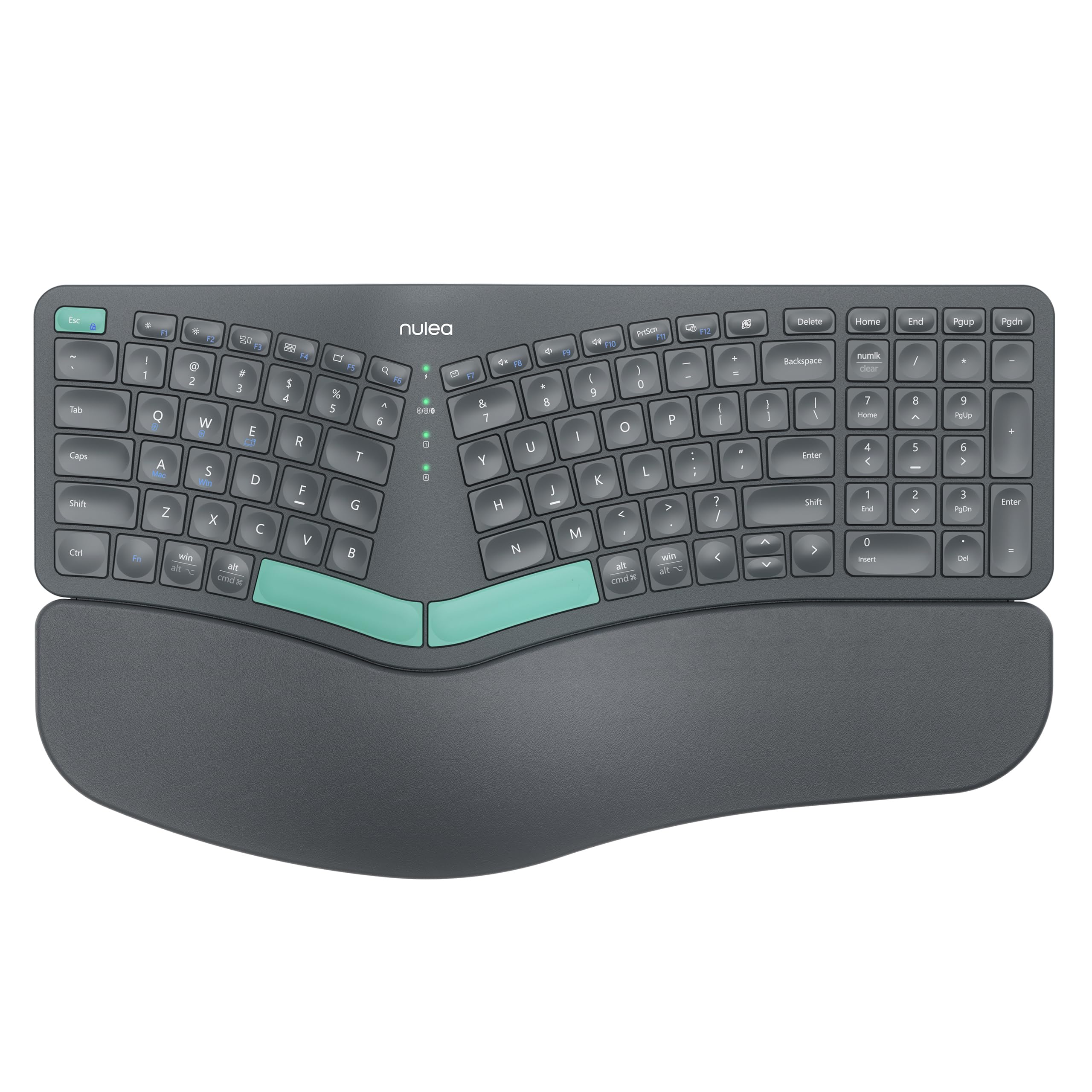
The defining feature here is the split layout, which angles the keys to match how your hands naturally rest. Buyers report the adjustment is surprisingly quick, with the design feeling natural within 2 to 3 days of use. The oversized leatherette wrist rest (a soft, skin-friendly material) is the thing everyone raves about, earning it the top spot for comfort among owners.
You get real flexibility in how you connect, with dual-mode Bluetooth and 2.4G wireless for switching between devices. The built-in rechargeable battery delivers an impressive 206-hour life, so you can go weeks without hunting for a charging cable. Three adjustable tilt legs let you customize the angle to whatever feels right for your posture.
The crowd favorite — 4.4 stars across 200+ owners — with quality being the most-praised aspect. The honest trade-off is the lack of backlighting, which a few owners specifically wished for, so it’s best suited for well-lit rooms.
What wins people over
- 206-hour battery life keeps you typing for weeks
- Soft leatherette wrist rest earns high praise for comfort
- Easy setup with a quick learning curve
Who should look elsewhere
- No backlighting for low-light typing
- Compact size may feel small if you’re used to full-size boards
The right fit: This is for anyone wanting a true split design with long battery life and a plush wrist rest, straight from the start.
The one catch: If you need to type in the dark, you’ll want to add a desk lamp or look for a backlit model.
2. RECCAZR Wireless Keyboard and Mouse Combo
A full-size wave keyboard with a quiet mouse that delivers surprising quality for the money.
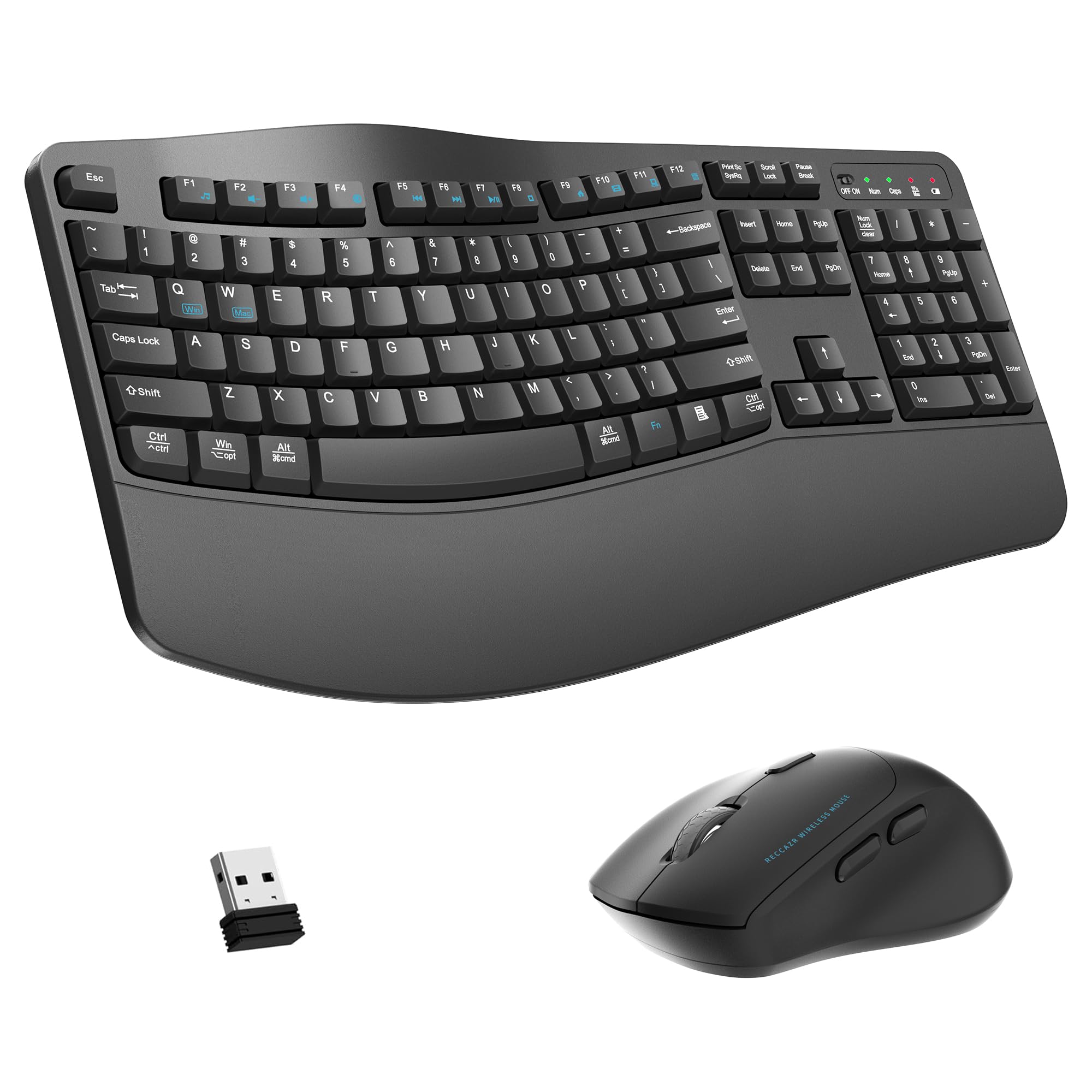
The main draw is the scientific wave keys design, which curves the layout so your fingers reach every key with less stretching. It’s a 104-key full-size board that includes the number pad, making it a direct fit for office work. The combo uses a single nano USB receiver for both devices, so you only give up one port.
The wireless mouse offers 3 DPI levels (800-1200-1600) for cursor speed control. Owners consistently praise the soft keys and quiet operation, noting it offers strong value for a home or office setup. The spill-resistant design with bottom drain holes adds a layer of everyday protection.
The honest weak point is the mouse: a handful of owners mention it failing after a few months, with cursor jumps that new batteries can’t fix. The keyboard itself is widely praised, so if you’re hard on mice, plan for a possible replacement.
Solid buy, one caveat: The keyboard and quiet mouse are excellent for the price, but the mouse is the less durable half of this pair.
3. SABLUTE MA41 Ergonomic Combo
The whisper-quiet wave keyboard with a cushioned leather palm rest for distraction-free focus.
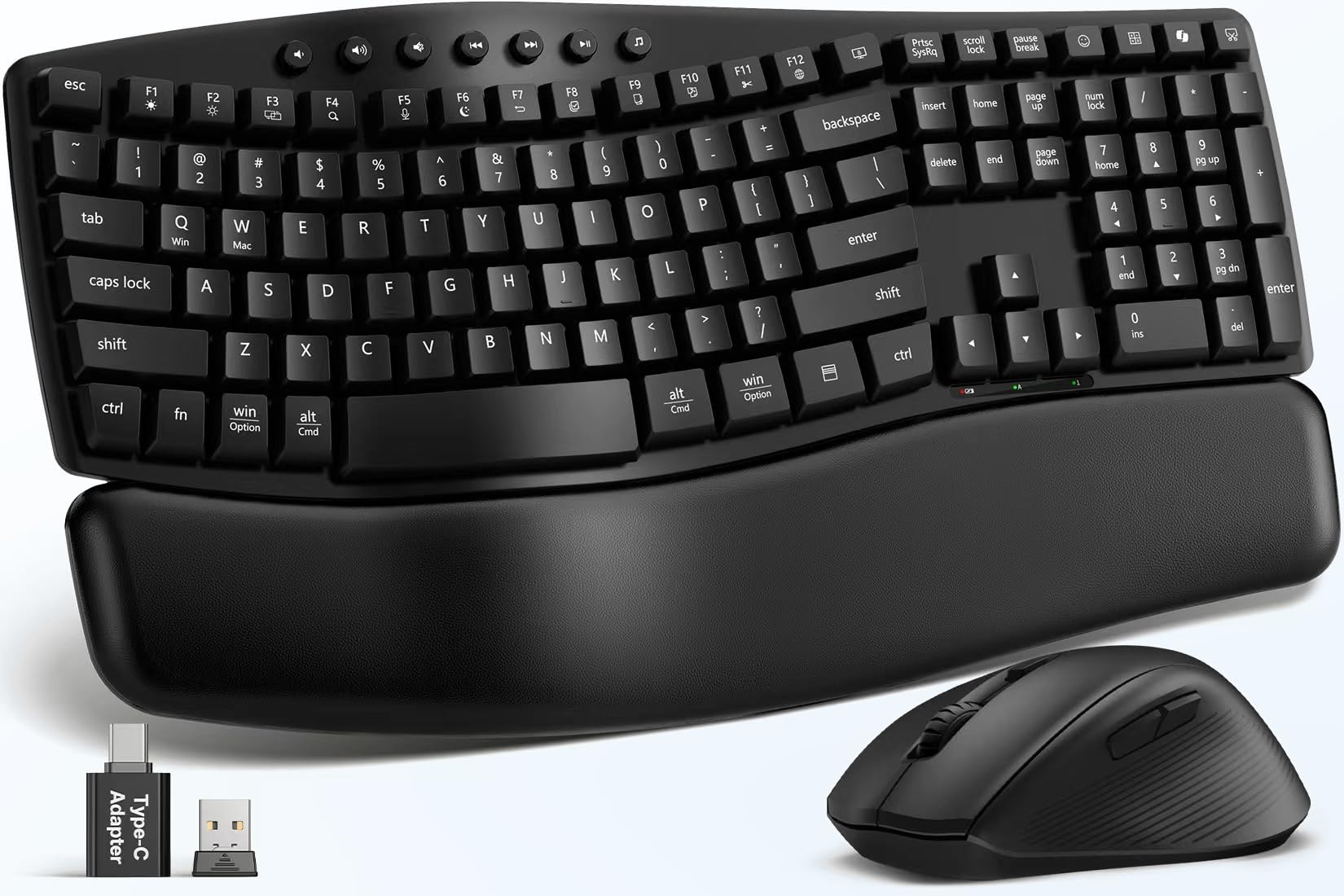
This set is built around quiet: 30dB typing and clicks cut noise by up to 90%, ideal for shared offices, meetings, or late-night sessions. The wave design includes 2 adjustable tilt angles to support a natural posture. Unlike hard plastic rests, the premium leather wrist rest provides soft, supportive cushioning that’s also easy to clean.
Durability is a headline feature: laser-etched keys are tested for up to 10 million keystrokes and backed by a 2-year replacement warranty. You get 12 productivity shortcuts for screenshots, media, calculator, and screen lock, keeping your hands on the board. The single 2.4GHz receiver connects both devices and includes a USB-C adapter, working with Windows, macOS, ChromeOS, Linux, and Android.
The design targets long battery life too: auto-sleep technology extends a set of 2 AAA and 1 AA batteries (not included) to 6–12 months of typical use. The most-discussed trade-off is connectivity — most owners connect without issue, but a subset report occasional hiccups.
Focus-friendly pick: If a noisy keyboard breaks your concentration, this 30dB set is purpose-built for a calmer workspace, with a 2-year warranty as a safety net.
4. Nulea Split Keyboard Grey Pink

A space-saving 86-key split board that keeps the numpad and the wrist relief.
This model shares the same split-design DNA as Nulea’s top pick but trims the layout to 86 keys, making it a good fit for smaller desks. It still includes a numpad for number-heavy work, and the oversized leatherette wrist rest carries over for all-day support. The pink-grey colorway gives it a softer look than the usual black slabs.
Customers note the ergonomic shape genuinely reduces hand fatigue, with the split angle easing tension after long days. It connects via Bluetooth or 2.4G, and the built-in rechargeable battery offers a 200-hour life. The construction uses plastic and silicone, with 4 adjustable legs for finding your ideal angle.
The most common positive is the build quality and comfort, which owners describe as excellent. The honest caveat is battery consistency: reports are split, with most saying a charge lasts a long time, but a minority finding it drains within a day.
Smart space-saver: You get the wrist relief of a split board in a smaller footprint, with the numpad intact for data entry.
5. SABLUTE MA31 Pro Combo

A wave keyboard with a 4000mAh battery and full RGB backlighting for style that lasts.
The standout spec is the 4000mAh rechargeable battery, lasting weeks per charge with auto-sleep. The silky-smooth faux lambskin palm rest and matte finish give it a premium feel that resists sweat and is easy to wipe down. Wave keys and adjustable front/back stands let you type for 8 hours without fatigue.
Backlighting is the visual hook: choose soft tones like blue, cyan, and white for calm focus, or bold colors like red, green, and purple to match your mood. The included RGB mouse packs a 700mAh battery, 6 buttons, and 3 DPI levels (800/1200/1600) with 6 fixed colors or 5 cycle modes. The keyboard adds 9 shortcut keys for one-touch productivity.
The single 2.4GHz USB receiver connects both devices up to 33 feet away, with USB-A and USB-C adapters for broad compatibility. What stands out in owner feedback is the lighting quality and smooth operation, though ergonomic comfort is the most mixed aspect, so it’s worth checking the fit for your hands.
Why it stands out
- 4000mAh battery lasts weeks between charges
- Dual RGB lighting on both keyboard and mouse
- Faux lambskin palm rest feels premium
Things to know
- Ergonomic fit gets mixed feedback, so test the angle
- Mouse can feel slippery for some grips
Reach for this if: You want a backlit, rechargeable set that looks great on a modern desk and won’t die mid-workweek.
Look elsewhere if: You need a dramatic split-key angle; the wave shape here is gentler than a true split board.
6. ProtoArc EKM01 Plus Combo

A full-size split combo that switches between three devices with one button press.
This is the productivity-focused pick. The full-size split and curved keyframe design helps position your wrist and forearm naturally, and the padded wrist rest uses a soft memory foam layer for support with less bending. The 4 adjustable tilt legs let you set a perfect angle whether sitting or standing. Owners consistently praise the ergonomics, with the sculpted mouse fitting the hand well and avoiding wrist pain.
The headline feature is multi-device control: connect the keyboard and mouse to up to 3 devices through the USB receiver or Bluetooth, and switch by pressing a single button. The contoured mouse includes a palm and thumb rest with a 2000 DPI sensor for precise control, plus forward and backward buttons for web browsing. This setup is great for multi-PC workflows, and owners note the instant input change across computers is a standout for ultrawide monitor setups.
Both devices are powered by a built-in 500mAh rechargeable battery, offering 250 hours of standby time after a 2-hour full charge, with auto-sleep after 30 minutes. The trade-off is size: at 20.75 inches wide, it demands real desk space, and it’s not backlit.
Desk command center: This is the pick for anyone juggling a laptop and desktop, with switching so smooth it feels instant.
7. X9 Performance Ergo Combo

A split combo with dual Bluetooth channels and a mouse owners call the best they’ve used.
The X9 Performance stands out for its connection options: 2 channels for Bluetooth and 1 for 2.4GHz, letting you pair and switch between 3 devices at once. The split “2-zone” design provides tailored hand placement, and the 4 kickstands allow adjustable typing angles. The mouse is the surprise star, with owners describing it as a fantastic fit that eliminates hand strain during long editing sessions.
Both components use rechargeable batteries with a USB-C port, and the charging cable is included. Reviewers point out the battery easily lasts a month or two between charges. The ergo keyboard uses a scissor switch 100-key layout with 14 shortcuts, while the mouse has 6 buttons with 4 DPI modes. It’s a durable build that survives drops, with thumb side buttons for forward and back navigation.
The ergonomic shape is the top praised feature, with owners noting it reduces hand strain and promotes a natural hand position. The honest caveat is that some users find the keyboard angle takes time to get used to, and a few report recurring connection drops that require re-pairing.
For the multi-device user: If you live across two computers and want a mouse that truly fits, this combo’s dual Bluetooth is a rare and useful feature.
8. Logitech MK850 Performance Combo

A full-size wave keyboard with a hyper-fast scroll wheel from a name you already trust.
The MK850 brings Logitech’s polished build to the ergonomic space. The oversized wave-shaped keyboard includes a cushioned palm rest and carefully-crafted keys that owners say feel great with a satisfying click and clack. The contoured right-handed mouse is the feature highlight, with a hyper-fast scroll wheel that can free-spin to fly through long documents or click to stop at each line.
Both devices are fully multi-device and multi-OS friendly, so you can start typing on your computer, then switch to a tablet, phone, or second computer. The mouse pairs with up to 3 screens, and the Logitech DuoLink software links the keyboard and mouse together for custom functionality. Owners highlight the easy multi-device switching between a PC and Mac as a major quality-of-life win.
The most striking owner story is battery life: one report of heavy daily use for about 2 years with AA batteries still showing 100%. The honest weak point is Bluetooth reliability, with a few owners reporting lag, disconnects, or repeated keystrokes when connected via Bluetooth rather than the USB receiver.
Trusted and long-lasting: If you want a wave keyboard with incredible battery endurance and a mouse with a genuinely useful scroll wheel, this is a name you can rely on.
9. Logitech Wave Keys & Lift Combo

A wave keyboard matched with a 57° vertical mouse for true whole-arm ergonomics.
This is the pair for people who feel strain in both hands. The Wave Keys keyboard uses a compact wavy design that supports natural hand, wrist, and forearm alignment, with a cushioned memory foam palm rest. The Lift mouse is the differentiator: its vertical shape takes the pressure off your wrist and promotes a more natural forearm posture, with a softly textured grip and snug thumb rest designed for small to medium hands.
Both devices are engineered for quiet, with whisper-quiet clicks and plunger key switches that deliver a tactile but discreet feel. The SmartWheel on the mouse adjusts scrolling speed to match your flicks. The set connects via Bluetooth Low Energy or the Logi Bolt USB receiver, and works with Windows and Mac. Shoppers say it’s a great solution for reducing hand and wrist pain, with one noting it was a winner after hand surgery.
The design is ergo-certified, meaning it passed testing against criteria set by leading ergonomists. The honest caveats are size and value: some find the keyboard compact and the mouse too small for larger hands, and opinions are split on whether it’s worth the price.
Whole-arm relief: This combo shines for those with wrist pain who want a vertical mouse, though bigger hands should double-check the fit.
Understanding the Specs
Split vs. Wave Layout
Split keyboards separate the keys into two halves that angle outward, matching your shoulder width. Wave keyboards curve the rows upward in the center. Both aim to keep your wrists straight, but split boards usually offer a more dramatic angle change, while wave boards feel closer to a standard keyboard.
Battery and Charging
Rechargeable keyboards with a USB-C port offer the convenience of not buying batteries, with life measured in hours (like 200 or 206). Others use standard AA or AAA batteries that can last months. Check both the battery type and the quoted life to see what fits your habits.
FAQ
Will a split keyboard work with my laptop?
How long does the battery last on a wireless ergonomic keyboard?
What is the difference between Bluetooth and 2.4G connectivity?
Can I use an ergonomic keyboard with both Windows and Mac?
Is a split keyboard better than a wave keyboard for wrist pain?
How many devices can I connect at once?
Are ergonomic keyboards quiet?
Do I need a wrist rest with an ergonomic keyboard?
Will a full-size ergonomic keyboard fit on my desk?
How long does it take to get used to an ergonomic keyboard?
Final Thoughts: The Verdict
Across the board, the wireless ergonomic keyboard winner is the Nulea Split Keyboard because it pairs a true split design with the best battery life at 206 hours and a wrist rest owners praise most. If you want a backlit style that lasts weeks, grab the SABLUTE MA31 Pro. And for those juggling a desktop and laptop, the ProtoArc EKM01 Plus is the one to reach for thanks to its instant three-device switching.
How We Picked
We do not accept paid placement. Every pick is matched to a real buyer and a real use-case; we do not hands-on test units.
Sources & Methodology
Specifications: manufacturer listings and product documentation. Review insights: verified customer reviews, as of August 2026. Pricing: not shown on this page (it changes often); check the current price via the retailer link.
As an Amazon Associate, Calories Fit earns from qualifying purchases. This does not affect which products we feature.