
Our readers keep the lights on and the coffee maker working hard! As an Amazon Associate, I earn from qualifying purchases.
Specs are compiled from manufacturer listings and verified buyer reviews and can change over time — please confirm the key details on the product page before buying.
An ergonomic keyboard with a wrist rest is meant to save your hands from the daily ache that comes from hunching over a standard flat keyboard. But picking the right one is tricky — the wrist rest can be too firm, the split angle too wide, or the wireless connection flaky. This guide cuts through all of that to show you exactly which models actually deliver on comfort and reliability, based on how real owners use them day in and day out.
I’m Mohammad — the founder and writer behind Calories Fit. This guide is built by comparing the manufacturers’ published specifications and the patterns across verified customer reviews, so you get each pick’s real strengths and trade-offs instead of marketing spin.
Whether you are hunting for your first split layout or upgrading from a tired membrane board, these are the best wireless ergonomic keyboard with wrist rest options that thousands of buyers have already tested for you.
Our Picks at a Glance

How To Choose The Best Wireless Ergonomic Keyboard With Wrist Rest
An ergonomic keyboard is only as good as the shape of its frame and the quality of the wrist rest beneath your palms. Here is what you need to know before you buy.
Split vs. Wave Key Frames
A split keyframe angles the left and right key groups outward so your wrists stay straight rather than bending toward the center. A wave shape is a gentler curve across a single board, which is easier to adjust to but provides less corrective support. If you already feel wrist pain, a split layout is usually the better investment.
Wrist Rest Material and Support
Memory foam and silicone provide lasting cushion, while hard plastic offers little relief. Leather or leatherette covers are easier to clean than fabric and resist sweat over long workdays. A rest that is too narrow lets your wrists hang off the edge, so look for a generously sized pad.
Connectivity and Battery Life
Bluetooth lets you switch between your laptop, tablet, and phone without plugging in a dongle, but a 2.4GHz USB connection is generally more stable and has lower latency. For battery life, a rechargeable keyboard saves you from buying packs of AA batteries, though replaceables mean you are never stuck waiting for a charge.
Quick Comparison
| Model | Best For | Key Frame | Weight | Connectivity | Amazon |
|---|---|---|---|---|---|
| Logitech Ergo K860★ Best Overall | Serious ergonomic correction | Split | 3.7 lbs | Bluetooth / USB | Amazon |
| SABLUTE MA41Best Value Combo | Budget combo with comfort | Wave | 2.3 lbs | 2.4GHz | Amazon |
| RECCAZR Wave KeysBudget Champion | Quiet office wave board | Wave | 2.5 lbs | 2.4GHz | Amazon |
| Nulea Split | Entry-level split | Split | — | Bluetooth / 2.4GHz | Amazon |
| ProtoArc KM60 | Multi-device compact combo | Wave | — | Bluetooth / 2.4GHz | Amazon |
| SABLUTE Purple MA31 | Stylish wave board | Wave | 2.7 lbs | 2.4GHz | Amazon |
| SABLUTE MA31 Pro | Premium backlit wave combo | Wave | 2.7 lbs | 2.4GHz | Amazon |
| ProtoArc EKM01 Plus | Full-size split with mouse | Split | 4.2 lbs | Bluetooth / 2.4GHz | Amazon |
In‑Depth Reviews
1. Logitech Ergo K860 Wireless Ergonomic Keyboard with Wrist Rest – Split
Our pick — over 4★ from 850+ verified ratings; the strongest balance of quality and price.
The crowd-favorite split that serious typists and reviewers alike call the gold standard for wrist relief.
Your wrists stay straight the moment you start typing, thanks to the Logitech Ergo K860’s split KeyFrame design (a frame that angles each keyboard half outward). At 3.7 pounds, it is heavier than the wave-style combos below, so it stays planted on your desk and does not slide during fast typing.
One owner reports: “still using the original battery after 7 months and still showing maximum battery life.” You connect via Bluetooth or USB, switch between Windows and Mac with a toggle, and adjust the palm lift through three tilt angles (0°, -4°, or -7°) using the built-in legs. The keys are quiet and crisp, with a shape that matches your fingertip curve. The trade-off: the K860 is keyboard-only — no bundled mouse, unlike the SABLUTE and ProtoArc combos. A few owners note that key legends can fade after extended heavy use, and the layout takes a day or two to learn if you are coming from a straight board.
What The Community Raves About
- Split design genuinely straightens wrist posture compared to flat keyboards
- Battery runs for months on two AAs — one owner reports 7+ months on the original cells
- Three tilt levels let you dial in the perfect angle for sitting or standing
The Honest Trade-Offs
- No mouse included — you need to buy one separately
- Key legends can fade after extended daily use
- Split layout takes a short adjustment period for first-time users
Who It Works For: If you already have wrist discomfort or spend 8+ hours typing daily, the K860 is the most proven wireless ergonomic fix on this list.
The One Caveat: This is a keyboard-only investment — you will still need to pick your own mouse separately.
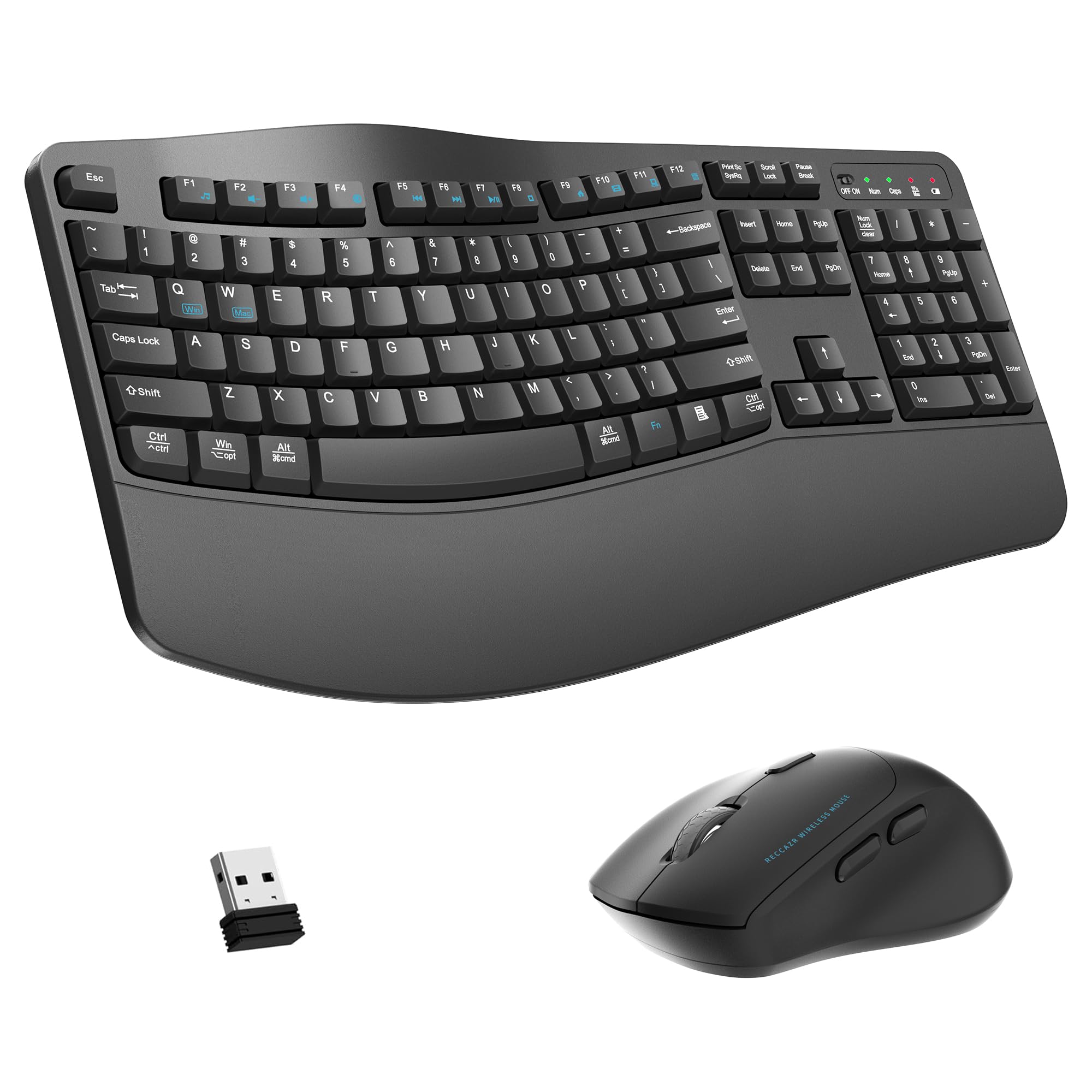
2. SABLUTE MA41 Wireless Keyboard and Mouse Combo
The wave-style combo that rivals pricier brands with a cushioned leather wrist rest and near-silent keys.
The SABLUTE MA41 breaks the rule that budget gear has to feel cheap. Its defining feature is the premium leather palm rest — a soft, supportive cushion that buyers compare favorably to far more expensive Logitech boards. The wave key frame curves gently to support a natural typing posture, and you get two adjustable tilt angles to fine-tune the position. At 2.3 pounds it is a full 1.4 pounds lighter than the K860, which makes it easier to carry between desks if you have a hybrid setup. The keyboard and mouse connect through a single 2.4GHz receiver, and keys are rated for 10 million keystrokes.
Noise is the other standout here. The 30dB rating means these keys are genuinely quiet — buyers report they create a much calmer workspace than the clickier Logitech boards. The optical mouse delivers smooth, responsive movement. There are 12 productivity shortcut keys for screenshots, media, calculator, and more. The main catch is that some owners mention connectivity hiccups, particularly with gaming use, and a few units arrived with initial pairing issues. But the brand’s customer service is frequently praised for replacing troubled units quickly.
The Real Sell: The leather palm rest on this budget combo feels more premium than many boards — it is the rare case where the price tag undersells the actual comfort.
Watch For: An occasional unit has pairing trouble; the included mouse is right-handed only.
Reach for this if: You want a complete keyboard-and-mouse set with a genuinely comfortable wrist rest and quiet keys without spending over.
Look elsewhere if: You need a split keyframe for serious wrist correction — the wave shape is gentler than a true split design.
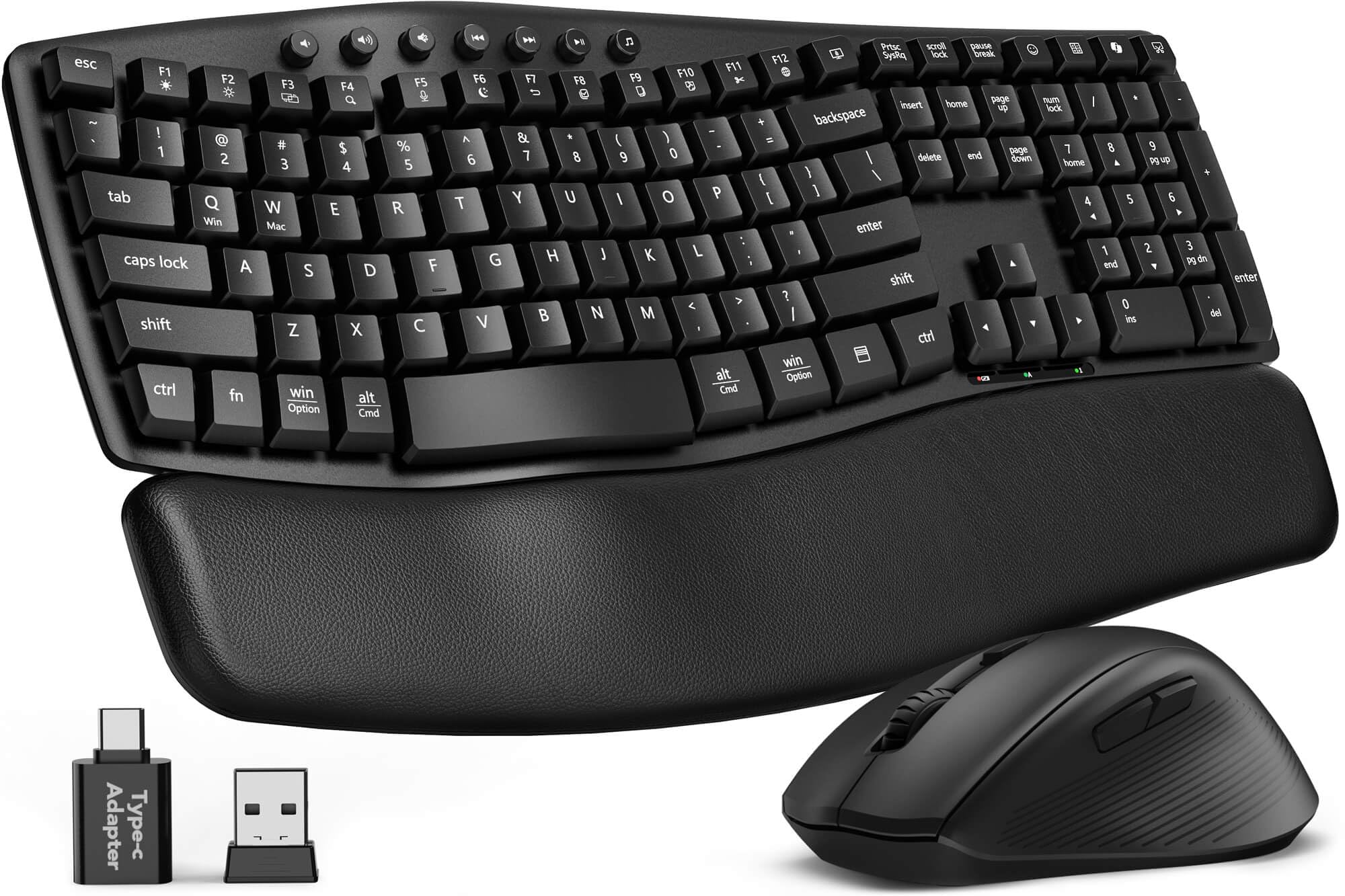
3. RECCAZR Wave Keys Wireless Keyboard and Mouse Combo
The most-reviewed budget wave board that wins on sheer value and spill-proof daily dependability.
With over 900 ratings, the RECCAZR Wave Keys is the most popular entry-level ergonomic combo on this list. The wave-shaped key frame lets your fingers reach every key naturally, and the included wrist rest with foldable stands helps reduce hand pressure during long sessions. The 104-key full-size layout includes a number pad, so spreadsheet work does not require awkward hand shifts. The wireless connection uses a 2.4GHz receiver with a 33-foot range, and you get a mouse with three DPI levels (800, 1200, 1600) and quiet clicks.
What buyers praise most is the quality-to-price ratio — the keys feel solid and responsive, and the setup is genuinely plug-and-play with no software needed. The keyboard is also spill-resistant, with bottom drain holes in case of accidents. The honest trade-off is that the mouse is the weaker half of this pair. A handful of customers note the mouse cursor drifting or the button failing after a few weeks, though the keyboard itself is widely considered reliable. The keys are quiet but not silent, and the battery runs on two AAs (not included).
The Strong Point: The build quality exceeds the price point, with owners calling it a great Logitech alternative for a fraction of the cost.
The Weak Link: The mouse has an occasional early-failure rate that is higher than the keyboard deserves.
Best for: Anyone who needs a reliable, full-size wave keyboard with a wrist rest and does not want to spend more than entry-level pricing.
skip it if: Mouse longevity is a top priority — consider the SABLUTE MA41 for a more proven wireless mouse.
4. Nulea Wireless Ergonomic Keyboard, Split Keyboard with Cushioned Wrist Rest
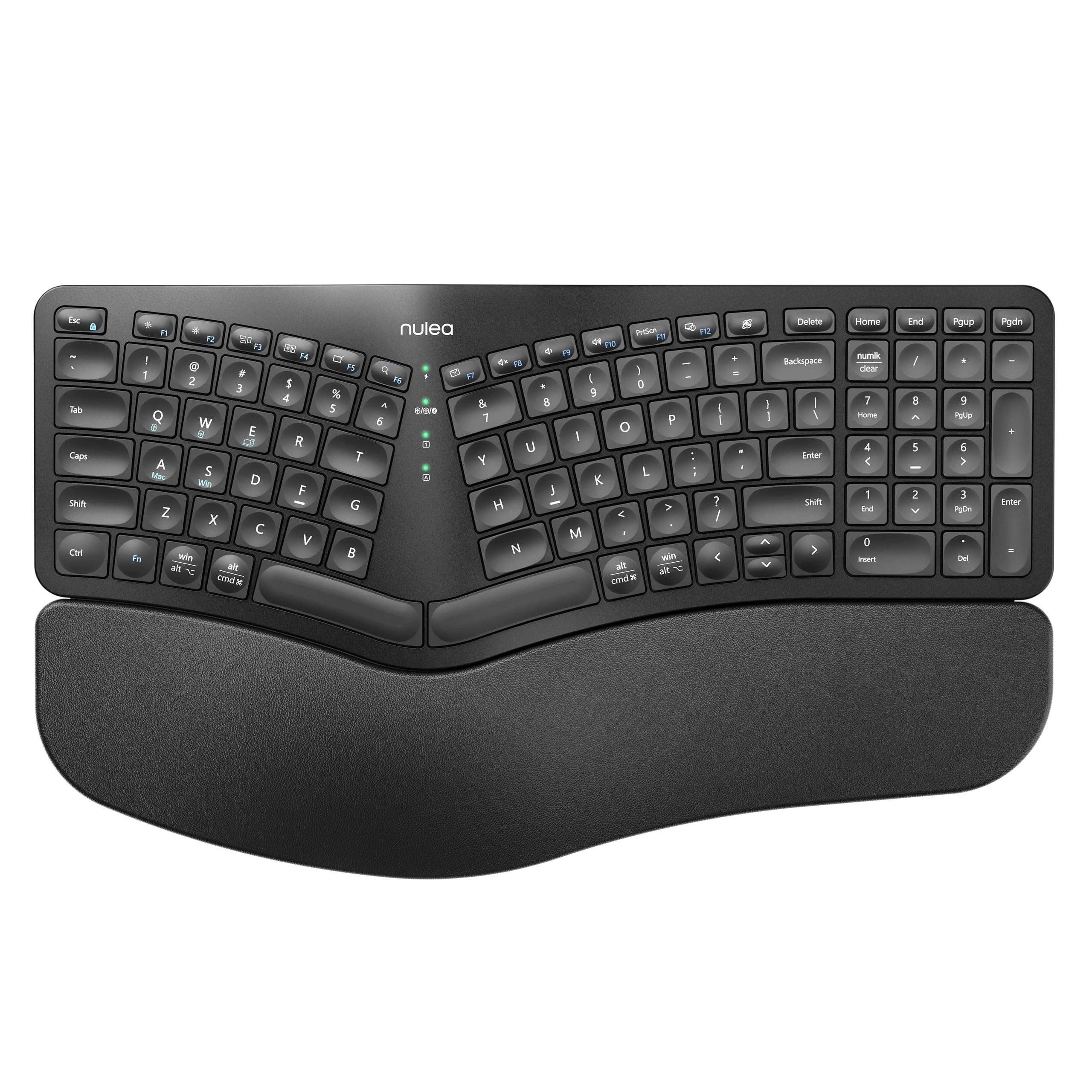
The most affordable true-split keyboard that brings ergonomic alignment to a wider audience.
Nulea offers something none of the wave-style combos above do: a genuine split keyframe at an entry-level price. The two halves angle outward to align with your natural hand position, which is the same core ergonomic principle that drives the premium K860. The oversized wrist rest is wrapped in a soft, skin-friendly leatherette material and provides ample support for both palms. The keyboard connects via Bluetooth or 2.4GHz and switches between devices easily. The 200-hour rechargeable battery is a standout — you can go weeks between charges, and the USB-C port means you are not swapping AAs.
Buyers who suffer from wrist pain and carpal tunnel symptoms consistently report real relief after switching to this board. The keys are quiet and the membrane feel is soft without being mushy. The main reliability data is mixed — about as many reviews praise the build as report early failure, specifically the Bluetooth connection dropping or the keyboard dying within a month. The instructions for pairing (Fn+F3, Fn+Esc toggles) are not obvious from the packaging. If you get a good unit, this is the best split value on the market; if you get a dud, returns are the remedy.
The Reason To Buy: The split design is the real ergonomic deal — owners with carpal tunnel symptoms say it is the first keyboard that genuinely helps.
The Risk: Early unit failures happen often enough that you should buy with a return-friendly seller.
Reach for this if: You are on a budget but need a true split keyboard, not just a wave curve.
Look elsewhere if: You cannot tolerate any chance of an early defect — the Logitech K860 has a much higher reliability track record.
5. ProtoArc KM60 Wireless Ergonomic Keyboard Mouse Combo

The ultra-light combo that lets you hop between three devices with a single button press.
The ProtoArc KM60 is built for the multi-device workday. You can connect the keyboard and mouse to three different devices — say a laptop, a tablet, and a desktop — using dual Bluetooth and a 2.4GHz receiver, then switch between them with one button. The leather-textured wrist rest and adjustable stand support a natural typing posture, and the full-size layout includes an independent number pad plus 12 multimedia shortcut keys. The mouse weighs just 63 grams, making it noticeably lighter than any other mouse in this lineup and easier on your hand during long cursor sessions.
Both the keyboard and mouse are Type-C rechargeable, with a built-in 500mAh battery in the keyboard and 300mAh in the mouse. Auto sleep kicks in after 60 minutes of inactivity to save power. The scissor-switch keys are quiet and responsive, and the mouse offers three DPI levels (1000, 1600, 2400). The catch is Mac compatibility — some reviewers point out that the function keys do not map correctly on macOS without manual remapping, and the CMD/Alt keys can end up swapped on 2.4GHz. The USB connection also failed for one owner after initial use, though Bluetooth remained functional.
The Standout Feature: Three-device switching works smoothly for dual-computer setups — no unplugging or re-pairing needed.
The Limitation: Mac users may need to remap function keys; the 2.4GHz mode has occasional compatibility quirks.
Best for: Anyone who works across a laptop, desktop, and tablet and wants to carry one keyboard-and-mouse combo between all three.
Think twice if: You are a Mac-only user who needs perfect out-of-the-box function key support.
6. SABLUTE Purple Ergonomic Wireless Keyboard and Mouse Combo (MA31)
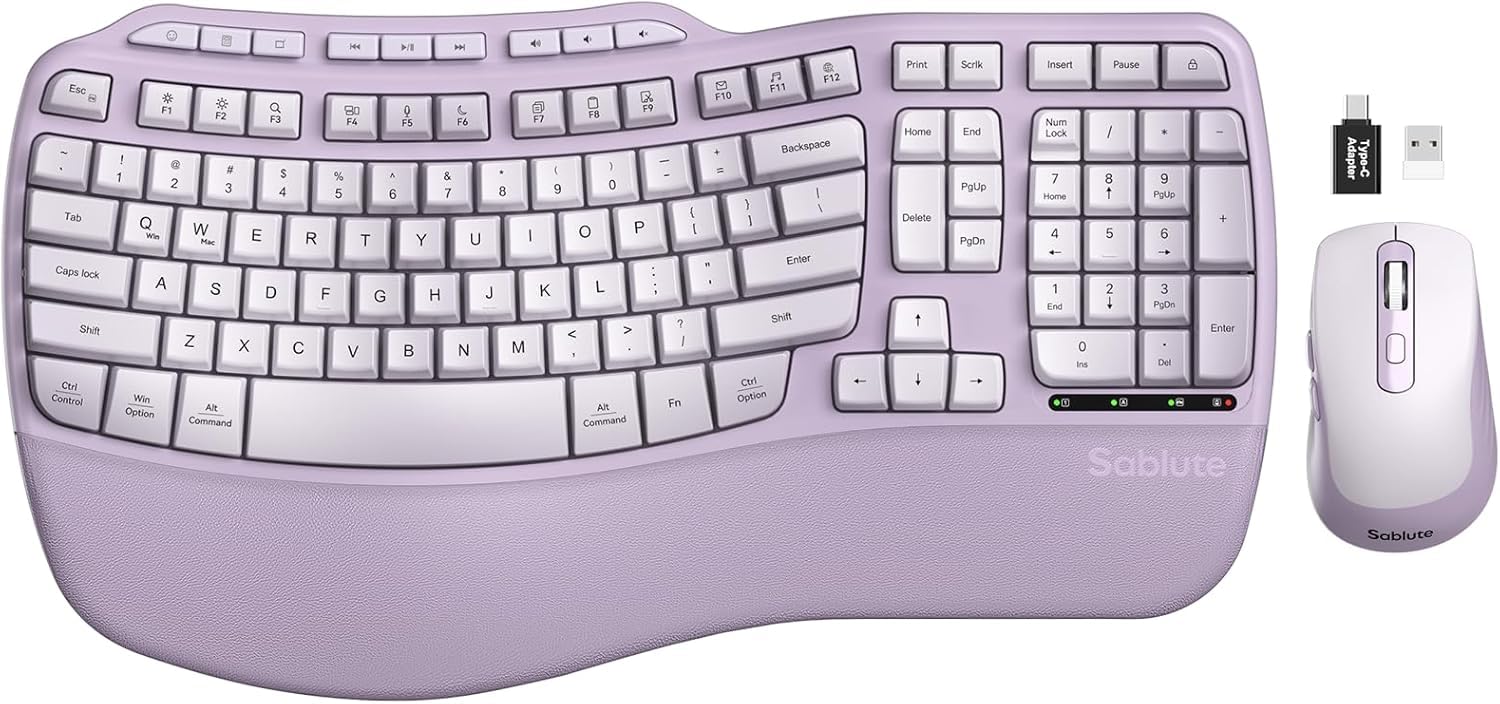
The purple wave keyboard that proves ergonomic gear does not have to be boring black or gray.
The MA31 is the same SABLUTE engineering as the MA41 but wrapped in a distinctive lavender-and-purple colorway that stands out on any desk. The wave-shaped key frame supports natural finger placement, and the palm rest uses an ultra-soft lambskin-like synthetic leather that owners describe as noticeably silkier than standard cushion rests. The material is sweat-proof and easy to wipe clean — a real advantage if you eat at your desk or have long work sessions. The keyboard has dual front and back stands for two tilt angles, and the 104-key full-size layout includes a number pad.
The SilenceTouch mouse promises quieter clicks with a rubber scroll wheel, and you get three adjustable DPI levels (800, 1200, 1600) plus six buttons. The keyboard has nine shortcut keys for apps, volume, and browsing. The honest word from owners is that this is a quality product with a few rough edges: some keys can feel slightly sticky during fast typing, and a small number of units arrived with a faulty mouse. The brand’s customer service is responsive — one owner who had a mouse issue was sent a full replacement set without needing to return the first one. The keys are quiet but not whisper-silent; the mouse is not designed for gaming.
The Appeal: The lavender color is genuinely refreshing in a category full of gray and black boxes, and the palm rest material feels premium to the touch.
The Reality: Quality control on the mouse is inconsistent, though the brand backs it with active customer support.
Reach for this if: You want a stylish wave keyboard with a soft palm rest that stands out on your desk and works reliably for office tasks.
Look elsewhere if: You need a gaming-grade mouse or cannot tolerate any chance of a faulty unit.
7. SABLUTE MA31 Pro Ergonomic Wireless Keyboard and Mouse Combo

The wave board that adds backlit style and a massive battery without losing ergonomic focus.
The MA31 Pro takes the same wave-shaped key frame and faux lambskin palm rest as the standard MA31 but adds two big upgrades: a 4000mAh rechargeable battery and full RGB backlighting. The battery is enormous for a keyboard — it has a 4000mAh capacity, and intelligent auto-sleep means it lasts weeks on a single charge. The backlighting offers eight colors (blue, cyan, white, red, green, purple, yellow, plus soft tones) so you can match your mood or workspace lighting. The matte finish on the keyboard body resists fingerprints and looks clean on any desk.
The keyboard is rated for 10 million keystrokes. The mouse packs a 700mAh battery with 6 buttons and 3 DPI levels (800, 1200, 1600), plus its own RGB lighting with 6 fixed colors and 5 cycle modes. There are 9 one-touch shortcut keys on the keyboard, including calculator and emoji keys. The main trade-off is weight — at 2.7 pounds it is a touch heavier than the standard MA31, and some owners find the left palm rest slightly too small for extended comfort. A few units have had the space bar or enter key feel a bit off, though most reviews praise the solid build.
Why Owners Love It
- 4000mAh battery lasts weeks even with backlighting on — far longer than the competition
- RGB backlighting with 8 colors and multiple modes adds desk ambiance
- Faux lambskin palm rest is soft, sweat-proof, and easy to wipe clean
- 10M keystroke durability
The Things To Know
- Left palm rest area is slightly shorter than ideal for larger hands
- A few owners note the space bar or enter key has an unusual feel
- Heavier than the standard MA31 at 2.7 pounds
Best for: Anyone who wants a backlit wave keyboard with a premium palm rest and a battery that does not need weekly charging.
Think twice if: You have very large hands and need a generous palm rest across the full width of the board.
8. ProtoArc EKM01 Plus Wireless Ergonomic Keyboard Mouse Combo

The full-size split combo that comes closest to Logitech-level ergonomics with a dedicated mouse included.
The ProtoArc EKM01 Plus is the only full-size split keyboard-and-mouse combo on this list that truly competes with the Logitech K860. The curved, split keyframe positions your wrists and forearms in a relaxed natural posture, and the cushioned wrist rest uses a soft memory foam layer to keep your palms comfortable during all-day sessions. The keyboard connects to up to three devices simultaneously via Bluetooth or 2.4GHz, and you can switch between them with a single button. The full-size layout includes a dedicated number pad and an independent row of F-keys. Note that the keyboard is not backlit, which keeps battery life strong and the price lower than many backlit models.
The contoured mouse has palm and thumb rests for a natural hand position, 2000 DPI precision, and forward/backward browsing buttons. The keyboard and mouse are both Type-C rechargeable with a 500mAh battery that delivers 250 hours of standby after a 2-hour full charge. Auto sleep kicks in after 30 minutes of inactivity. The feedback from owners is overwhelmingly positive — the term “silent and perfect” appears repeatedly, and buyers who switched from Microsoft ergonomic boards find the transition easy. A small number report a squeaky space bar or accidentally pressing the mouse forward/back buttons.
What Owners Love
- Split curved design rivals the Logitech K860 for wrist posture correction
- Cushioned memory-foam wrist rest is comfortable for all-day typing
- Three-device Bluetooth/2.4GHz switching works smoothly across Windows and Mac
- Keyboard and mouse are both Type-C rechargeable with good battery endurance
The Honest Downsides
- Space bar can develop a squeak on some units
- Mouse forward/back buttons are easy to press accidentally
- No backlighting — if you type in the dark, this is not the pick
Reach for this if: You want the most complete split-board-and-mouse package available — it gives you the same ergonomic principles as the K860 but at a lower cost and with a matching mouse.
Look elsewhere if: You need backlit keys or you are left-handed — the sculpted mouse is designed for right-hand use.
Understanding the Specs
Split vs. Wave Key Frame
A split keyframe divides the keyboard into two separate angled halves so your wrists stay straight rather than bending toward the center. This is the most effective ergonomic design for reducing wrist strain. A wave keyframe is a continuous curve that lifts the middle keys higher than the outer rows — it is gentler and easier to adapt to but provides less corrective support for existing wrist pain.
Wrist Rest Material and Coverage
The wrist rest material directly affects how your palms feel after six hours of typing. Memory foam and silicone gel provide lasting cushion. Leather or leatherette covers are easier to clean than fabric and resist sweat. A rest that is too narrow forces your wrists to hang off the edge, so check the width against your typical hand position.
Battery Capacity and Charging
Rechargeable keyboards use built-in lithium batteries measured in milliamp-hours (mAh). A typical keyboard battery is around 500mAh; the SABLUTE MA31 Pro packs 4000mAh. Keyboards that run on AA batteries last months per set but require you to keep spares on hand. Auto-sleep features help both types conserve power during breaks.
Connectivity: Bluetooth vs 2.4GHz
Bluetooth lets you pair with devices without a physical receiver — essential for tablets and phones. A 2.4GHz USB connection uses a nano dongle and generally offers lower latency and more stable signal, especially in offices with many wireless devices. Some keyboards support both, letting you switch between the two types of connection.
FAQ
Will a split keyboard help with carpal tunnel pain?
Can I use a wireless ergonomic keyboard with a Mac?
How long does the battery last on a rechargeable ergonomic keyboard?
Is a wave-shaped keyboard better than a flat keyboard for wrist pain?
Can I use one wireless receiver for both keyboard and mouse?
What is the difference between membrane and scissor-switch keys?
Do these keyboards work with a tablet or smartphone?
How do I clean a leather or leatherette wrist rest?
Which has the best wrist rest: Logitech K860 or ProtoArc EKM01 Plus?
Are backlit ergonomic keyboards worth the extra cost?
Final Thoughts: The Verdict
If you want one dependable pick, the wireless ergonomic keyboard with wrist rest winner is the Logitech Ergo K860 because its split keyframe, pillowed rest, and proven battery life make it the safest investment for anyone with wrist concerns. If you want a complete keyboard-and-mouse set with a premium wrist rest, grab the ProtoArc EKM01 Plus. And for a stylish backlit wave board that recharges twice as fast as it drains, the SABLUTE MA31 Pro is the one to reach for.
How We Picked
We do not accept paid placement. Every pick is matched to a real buyer and a real use-case; we do not hands-on test units.
Sources & Methodology
Specifications: manufacturer listings and product documentation. Review insights: verified customer reviews, as of July 2026. Pricing: not shown on this page (it changes often); check the current price via the retailer link.
As an Amazon Associate, Calories Fit earns from qualifying purchases. This does not affect which products we feature.