
Our readers keep the lights on and the coffee maker working hard! As an Amazon Associate, I earn from qualifying purchases.
Specs are compiled from manufacturer listings and verified buyer reviews and can change over time — please confirm the key details on the product page before buying.
Right now, your wrist is probably resting at a painful angle, your fingers are stretching for keys that sit too far apart, and your mouse is forcing your arm into an unnatural twist. A wireless ergonomic keyboard and mouse combo is designed to end that daily grind. Whether you’re an office worker grinding out reports, a writer chasing deadlines, or a gamer burning the midnight oil, the right set can make your hands feel like they’ve had a long nap instead of a long workday.
I’m Mohammad — the founder and writer behind Calories Fit. This guide is built by comparing the manufacturers’ published specifications and the patterns across verified customer reviews, so you get each pick’s real strengths and trade-offs instead of marketing spin.
We’ve separated the true comfort champions from the flashy also-rans to help you finally find the wireless ergonomic keyboard and mouse set that turns your desk into a pain-free zone.
Our Picks at a Glance
How To Choose The Best Wireless Ergonomic Keyboard and Mouse
Choosing an ergonomic set means matching the design to your hands, desk, and work habits, not just looks. It’s about matching the design to your hands, your desk, and the way you actually work. The right fit can eliminate wrist pain, while the wrong one leads to a frustrating week of adjustment.
Shape Matters: Wave vs. Split
The two dominant designs are wave-shaped (also called curved) and split. A wave keyboard, like those from Logitech, lifts the center of the board so your hands sit at a more natural angle. A split keyboard physically separates the keys into two zones that match the angle of your shoulders and arms. Both are good, but split boards take more getting used to if you’re a touch typist.
Wireless Connectivity: The Invisible Battle
You’ll see two main connection types. A 2.4GHz USB receiver (like a Logitech Bolt) is the most stable, low-latency option, perfect for office work where a dropped keystroke is a disaster. Bluetooth frees up your USB ports and lets you switch between multiple devices like a laptop, desktop, and tablet. The best combos offer both, letting you pick the mode that fits your setup.
Battery Life and Charging
The best ergonomic experience is one where you never think about power. Some sets use standard AA or AAA batteries, which can last up to a year or more with auto-sleep. Others have built-in rechargeable batteries that you top up with a USB-C cable. Rechargeable is more convenient in the long run, but you’ll want a long capacity, measured in mAh, so you aren’t charging every week.
Quick Comparison
| Model | Best For | Connectivity | Power Source | Mouse DPI | Amazon |
|---|---|---|---|---|---|
| COLIKES RGB Combo★ Best Overall | Best Overall — Feature-Rich | 2.4GHz (USB-A/USB-C) | Rechargeable (2500mAh Kb) | Up to 3200 | Amazon |
| Ubxxziy NK-905Budget Champion | Budget Wireless Value | 2.4GHz USB-A | 2x AAA (included) | 3 Levels | Amazon |
| SABLUTE MA31Style Pick | Style + Comfort (Purple) | 2.4GHz USB | 2x AA | 800/1200/1600 | Amazon |
| Lomiluskr Split Ergo | True Split Keyboard Budget | 2.4GHz USB | 2x AAA (included) | 1200/1600/2400 | Amazon |
| MOFII Blue Gradient | Aesthetic Office Centerpiece | 2.4GHz USB (nano) | — | 3 Levels | Amazon |
| SABLUTE MA31 Pro | Backlit + Huge Battery | 2.4GHz USB (33ft) | Rechargeable (4000mAh Kb) | 800/1200/1600 | Amazon |
| ProtoArc EKM01 Plus | Multi-Device Split Pro | Bluetooth + 2.4GHz | Rechargeable (500mAh) | 2000 | Amazon |
| Logitech MK850 | Multi-Device Productivity | Bluetooth + USB-A | AA Batteries | Standard (8 buttons) | Amazon |
| Logitech Wave Keys + Lift | Premium Ergo Vertical Setup | Bluetooth LE + Logi Bolt | AAA + AA (included) | Standard | Amazon |
In‑Depth Reviews
1. COLIKES RGB Wireless Combo
Our pick — over 4★ from 100+ verified ratings; the strongest balance of quality and price.
A feature-rich combo with silent keys, RGB lighting, and a comfortable wave design.
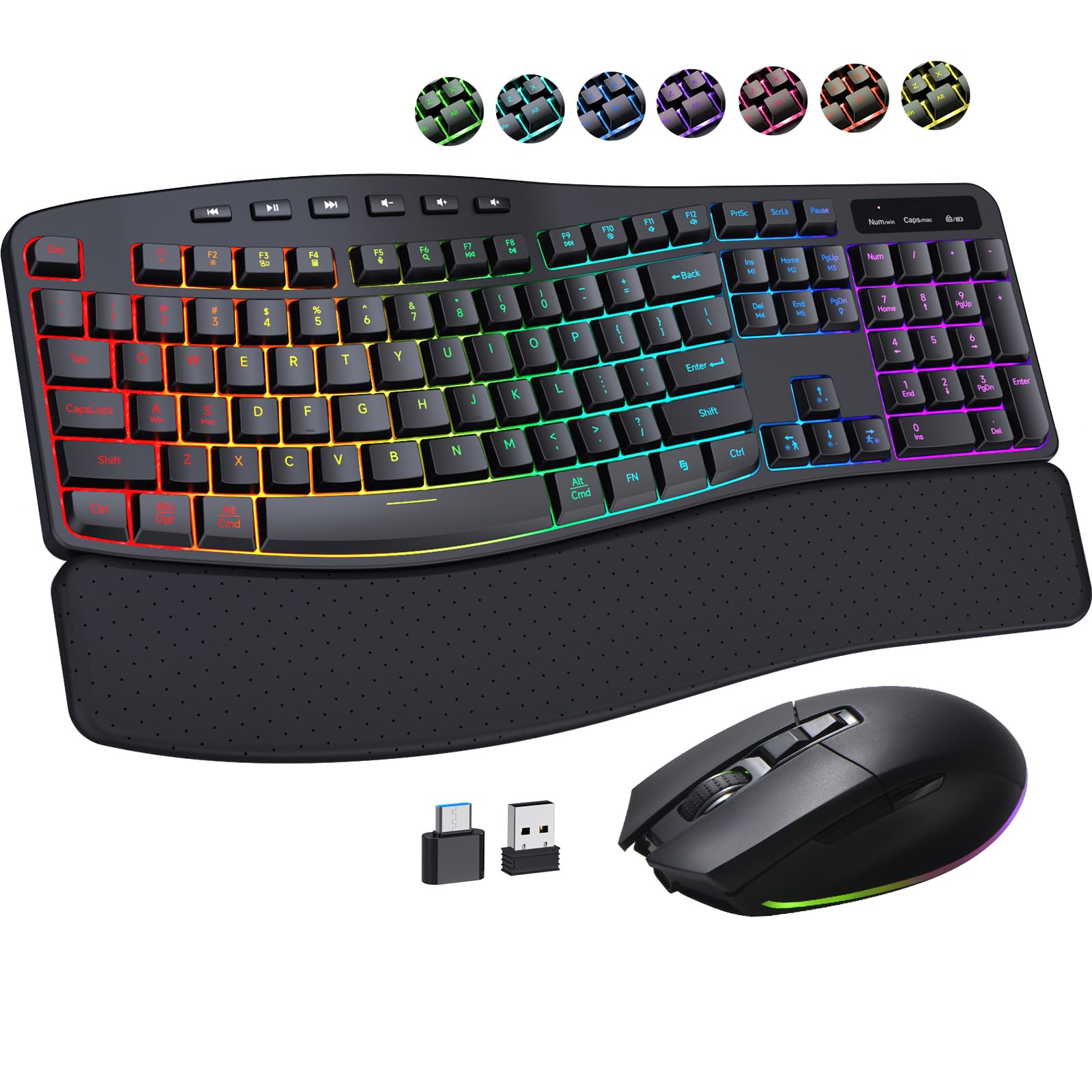
This set wins the top spot by cramming in everything you’d want without making you hunt for dongles or software. The keyboard uses an ergonomic wave design with a soft leather wrist rest that features ventilation holes, so it stays breathable and sweat-proof during long workdays. The keyboard packs a 2500mAh battery while the mouse gets 800mAh, giving you weeks of mixed use between charges.
What makes the COLIKES stand out is the sheer customization on offer. The keyboard sports 15 RGB lighting modes (breathing, wave, gradient, static) while the mouse adds another 13 modes, all adjustable or fully off. Beyond the glow, the mouse is a silent performer with 800/1600/2400/3200 DPI steps, letting you slide from precise photo editing to fast cursor sweeps across dual monitors without missing a beat.
You can move between an office PC and a home iMac without adapter hassles, because the system auto-detects Windows, macOS, or Linux. It comes with both a USB-A and a USB-C receiver, so you can plug into either port. The main trade-off is battery awareness: some buyers report the battery dies frequently without warning, so keep it plugged in when the charge gets low.
Owner Obsessions
- Functionality wins people over — it’s solid for both work and gaming
- Whisper-quiet keys with a soft typing sound
- Full-size keys that react immediately for fast typing
Watch Outs
- Battery can die without much warning, per owner reports
- One buyer wished the light could be turned off completely (it can’t)
Your best bet: The complete package for RGB flair, silent typing, and long battery life in one box.
Think twice if: You have zero tolerance for charging — this one’s battery needs a top-up every few weeks.
2. Ubxxziy NK-905 Ergonomic Combo
An entry-level wave keyboard with a 12-month battery life that rarely needs a swap.
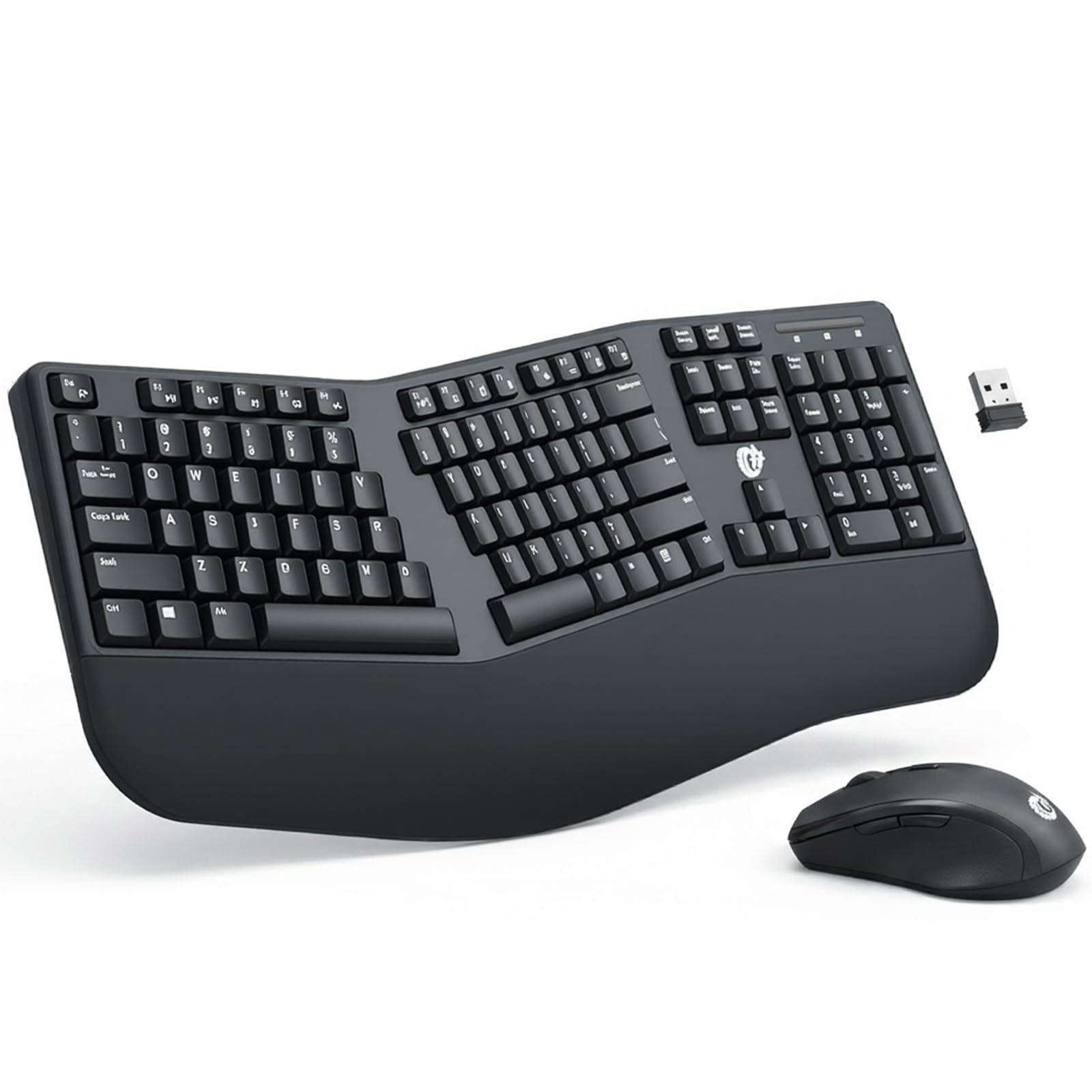
The Ubxxziy NK-905 is proof that budget-friendly can still mean thoughtfully designed. The keyboard’s wave-shaped keys let your fingers reach every key naturally, while the glossy edges and low-profile design keep it looking sleek on a modern desk. It connects via a single 2.4GHz nano receiver that stays stable up to 10 meters, needing just one USB port for both devices.
Power is where this combo shines bright. The auto-sleep mode kicks in after 5 minutes of idle time, stretching the included AA and AAA batteries to a claimed 12 months of use. You get 12 hotkeys for media control, email, and search, plus a one-click wake-up so you never fumble to get back to work.
The biggest caveat owners mention is the mouse’s behavior when idle: it can freeze up whenever not being used, requiring a nudge to wake it. The keyboard itself works well and even earns playful praise for its retro style. Just note that the hotkeys may not be fully compatible with Mac systems, so Windows and Android users get the best experience.
Best For: A wallet-friendly pick for Windows users who want a wave-shaped board without the premium price tag.
3. SABLUTE MA31 Wave Keys
A lavender set with a memory foam palm rest and a nearly silent mouse.
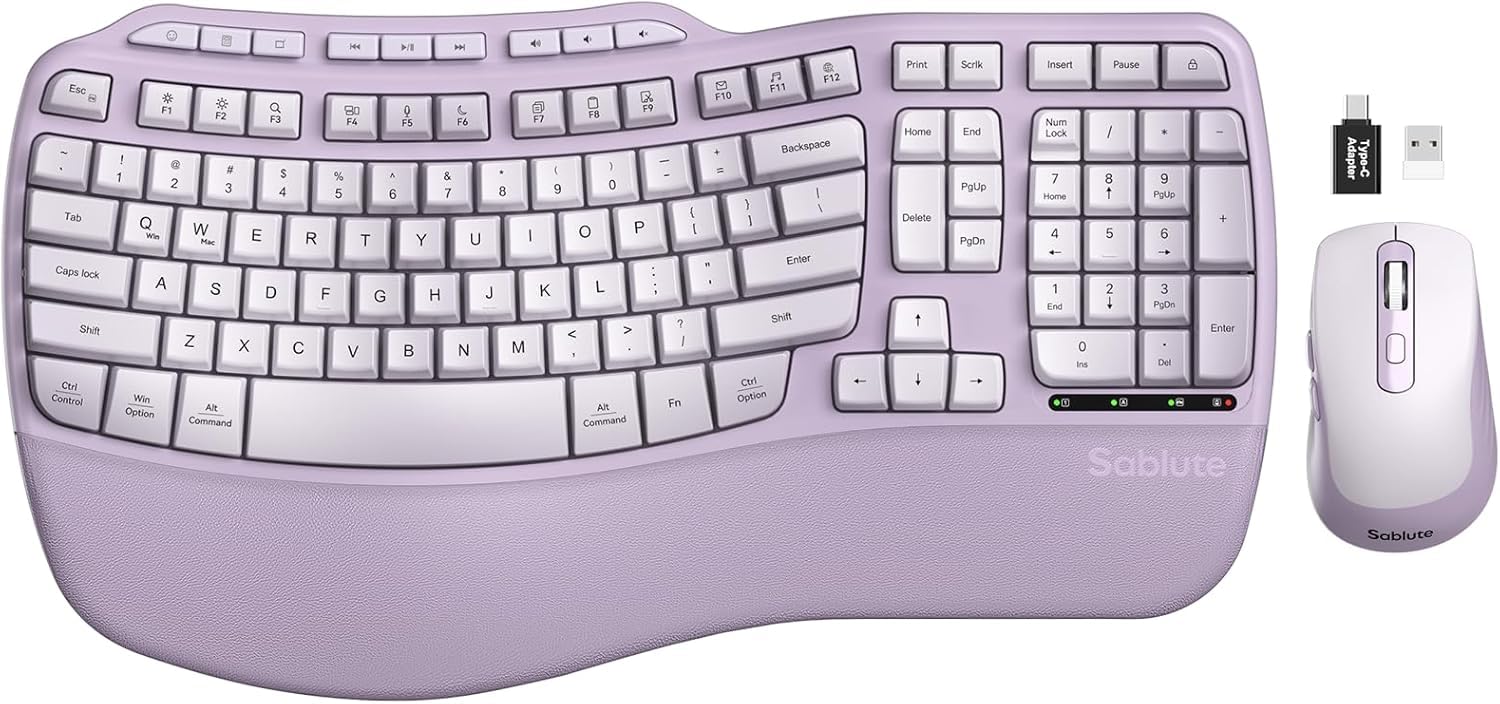
The SABLUTE MA31 is the set that makes your desk feel like a spa. Its wave-shaped keys are designed to cradle your fingertips, reducing typing errors by up to 15% while the synthetic leather palm rest delivers an ultra-soft, lambskin-like feel. This leather is sweat-proof and easy to clean, standing up to daily grind without wearing out.
Comfort is adjustable here. Front and back stands flip up to give you two different angles, whether you’re seated at a desk or standing at a work table. The mouse lives up to the “SilenceTouch” name, with clicks that are 90% quieter and a rubber wheel that scrolls without the rattle. It adds 6 buttons and 3 adjustable DPI levels (800/1200/1600) for precision work.
Owners rave about the padded wrist rest — “I love the padded wrist rest!” — and find the mouse comfortable and easy to locate. The trade-off centers on the keys: they’re deep and can feel noisier than a Mac user might prefer, and some report keys getting stuck while typing. If you’re on an iMac, the keyboard includes labels for both PC and Mac shortcuts.
Reach for this if: You want a gorgeous purple set with a plush palm rest and a nearly silent mouse for a home office.
Look elsewhere if: You’re a light typist who hates deep key travel — these keys are taller than a Mac’s.
4. Lomiluskr Split Ergo Keyboard

A genuinely split board for carpal tunnel warriors who want natural posture on a budget.
The Lomiluskr Split Ergo is the real deal for people who’ve been told they need a split keyboard but don’t want to mortgage the house. Its split and sloping design matches the natural angle of your arms and hands, promoting a neutral typing posture that eases muscle strain in your wrists and forearms. The low keys trigger with a light press, reducing typing stress.
The integrated wrist rest is covered in high-quality PU leather over a cushion that owners describe as “squishy” and comfortable. The mouse adds a palm grip in the same PU leather for a non-slip hold, with 3-level DPI switching between 1200/1600/2400. Everything connects over a single 2.4GHz receiver that reaches up to 10 meters.
Comfort and looks earn the most praise, with the cute purple color and soft, quiet keys winning fans. The reality check comes from reliability: this set earns top marks for ergonomics (107) but its most-discussed aspect is negative reliability (102). Common complaints include keys that stick, a dongle that failed after about a year, and stiff keys missed spaces. It’s a budget-friendly introduction to split boards, best for light to moderate daily use.
The default DPI is 1600, and it’s powered by 2 AAA batteries (included) with an auto-sleep after 3-5 minutes idle. One thing to know: this is strictly a 2.4G product — it will not pair with an iPad or phone via Bluetooth.
The honest read: Incredible value for the ergonomic design, but durability is a lottery ticket. Great for a secondary desk or someone on a tight budget.
5. MOFII Blue Gradient Combo
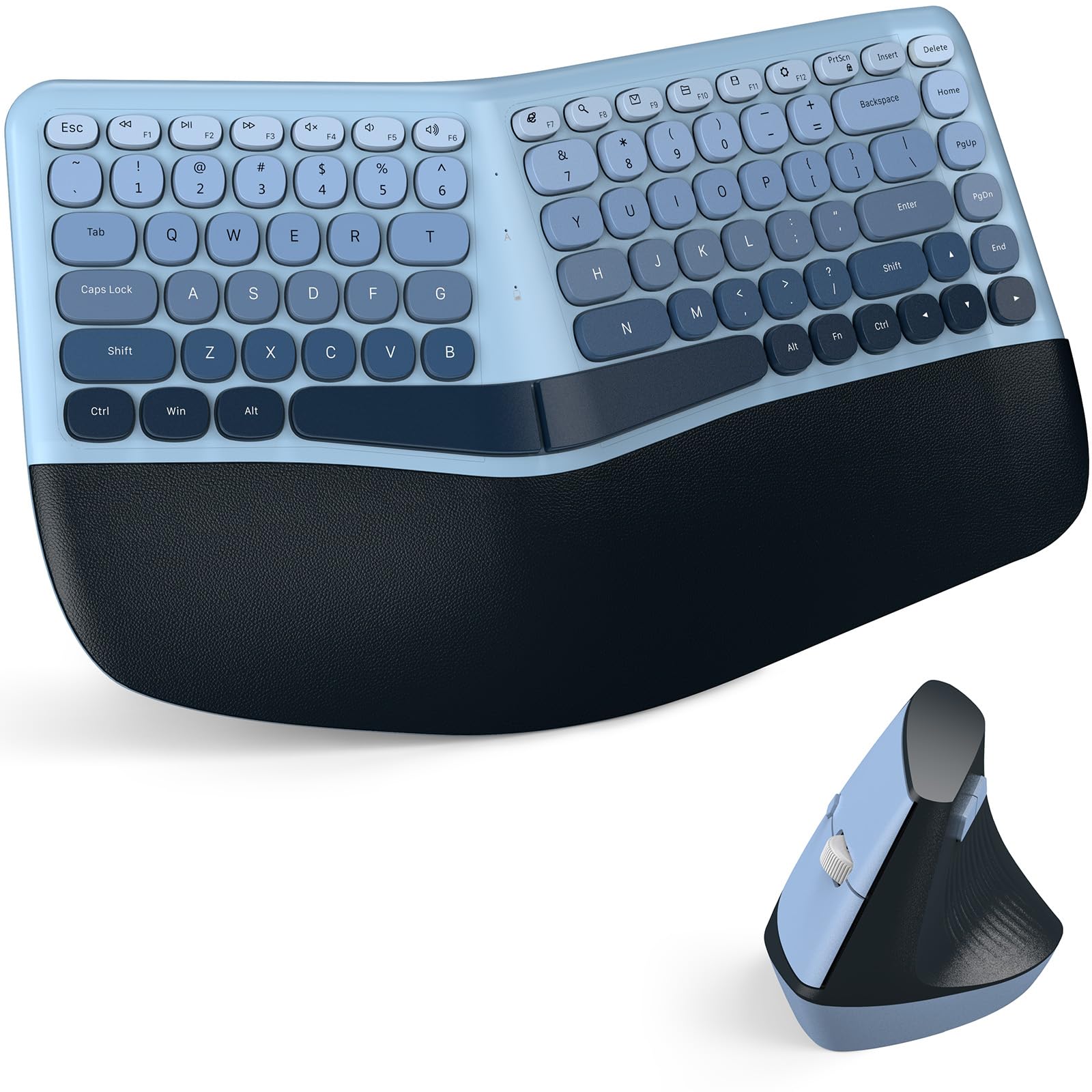
The retro-round-key stunner that turns your office into the envy of every coworker.
The MOFII Blue Gradient combo is the set people stop and ask about. Its curved split keycaps reduce pressure on your fingertips while the curved padded palm rest provides support from the moment your hands land. The leather-like palm rest surface resists stains and wipes clean easily, surviving the daily coffee-and-crumb routine.
The matching mouse is a vertical ergonomic design that fits the natural curve of your palm, easing wrist pressure during extended sessions. It offers 3 adjustable DPI levels for switching between accurate office tasks and faster scrolling. The built-in USB nano receiver stores inside the mouse, and one plug connects both devices with a reliable range of up to 10 meters (33 ft).
People genuinely love seeing this on a desk, and it runs on Windows (XP through 11) with no drivers needed. The trade-off is key feel: some owners find the round keys hard to press and report occasional sticking that causes typos. You get a 30-day money-back guarantee and a 12-month warranty for confidence.
Best for: The desk-jet-setter who wants a beautiful, conversation-starting setup and types at a gentle pace.
Not for: Heavy typists or gamers who need rock-solid key registration on every single press.
6. SABLUTE MA31 Pro

The rechargeable titan that lasts weeks on a charge and glows in any color you can imagine.
If you hate swapping batteries, the SABLUTE MA31 Pro is the answer. Its keyboard packs a massive 4000mAh rechargeable battery — double the capacity of standard backlit keyboards — that lasts weeks on a single charge. The keyboard is built to survive a staggering 10 million keystrokes, which is twice the life of a standard keyboard and means fewer replacements over the years.
The typing experience is wrapped in a silky-smooth faux lambskin palm rest and a matte finish that’s sweat-proof and easy to maintain. You get adjustable front and back stands to support healthy wrist posture whether sitting or standing. The wave keys deliver smoother typing that owners say remains comfortable for 8-hour sessions without fatigue.
Lighting is the star here. The keyboard offers soft tones (blue, cyan, white) and bold colors (red, green, purple, yellow) with 9 shortcut keys for boosting productivity. The RGB mouse brings a 700mAh battery, 6 buttons, and 3 DPI levels (800/1200/1600), plus 6 fixed colors or 5 cycle modes to match the keyboard’s glow. Connectivity reaches 33 feet via one 2.4GHz receiver with USB-A and USB-C adapters.
Owners highlight the long battery life and excellent value as top draws, and everything connects smoothly. The recurring caveat is the mouse: a few find it slippery in hand, and the left palm rest feels small for larger hands. It’s not the most sculpted option, but it’s a comfortable all-rounder for most desks.
The Highlights
- Quality construction with quiet, tactile keys
- Huge 4000mAh battery that truly lasts weeks
- Programmable lighting with 9 shortcut keys
The Trade-offs
- Some owners find the mouse slippery or too small
- Left palm rest area is compact for big hands
7. ProtoArc EKM01 Plus

A full-size split board built for multi-device power users who juggle three screens at once.
The ProtoArc EKM01 Plus is the productivity king for people living across multiple machines. Its full-size split and curved keyframe positions your wrists and forearms in a natural, relaxed posture, and it can connect to up to 3 devices simultaneously via USB receiver or Bluetooth. A single button press lets you jump from a PC to a tablet to a laptop without missing a keystroke.
Comfort comes from a curved wrist rest packed with soft memory foam, plus 4 adjustable tilt legs that position the board at your ideal angle for sitting or standing desks. The contoured mouse adds palm and thumb rests, keeping your hand in a natural position while the 2000 DPI sensor provides precise tracking. Forward and backward buttons simplify web browsing.
The built-in 500mAh rechargeable battery offers 250 hours of standby after just 2 hours of charging, with auto-sleep after 30 minutes of inactivity. Owners rave about immediate wrist relief and quiet, responsive scissor keys. The honest trade-offs: this is not a backlit keyboard (the data is explicit), and the included dust cover can occasionally trigger Bluetooth disconnects or repeated key presses.
At 20.75″ L x 11″ W, this is a big board. It’s better to measure your desk before buying to make sure you have the room.
Your pick if: You switch between a desktop, laptop, and tablet daily and want one set that controls them all.
Skip if: You need backlighting for night work — this model doesn’t glow.
8. Logitech MK850 Performance

Logitech’s multi-OS workhorse brings a hyper-fast scroll wheel and legendary battery stamina.
The Logitech MK850 is built for the productivity purist who values reliability above all else. This full-size keyboard features carefully-crafted keys and a cushioned palm rest for quiet, comfortable typing over long stretches. The contoured right-handed mouse is the real hero, with its hyper-fast scroll wheel that lets you fly through documents and web pages with a single flick.
You can start typing on your computer, then switch to a tablet, phone, or second computer smoothly, because both devices pair via Bluetooth or the included USB-A receiver. The mouse pairs with up to 3 screens, and the Logitech DuoLink software links keyboard and mouse together for custom functionality — a step up from simpler combos.
Battery life is the headline: owners mention the AA battery lasts roughly 2 years at 100% capacity even with daily use. The keyboard’s key click and clack sound has its own fans. The main concern comes from Bluetooth quality — some customers note lag, disconnects, and repeated keystrokes on multiple PCs. This is a premium-priced set that delivers when the connection holds, but the Bluetooth experience isn’t universally flawless.
Who it’s for: Office workers who spend hours in documents and want a reliable, multi-device setup with a famous brand behind it.
Watch out: The Bluetooth connection is the weak link — the dongle stays rock solid.
9. Logitech Wave Keys + Lift Vertical

The ergo-certified duo that lifts your hand into a 57° shake-hands position for day-long relief.
The Logitech Wave Keys + Lift is the premium answer for anyone with specific hand and wrist pain. The Wave Keys keyboard uses a wavy design that supports natural hand, wrist, and forearm alignment, while its plunger key switches deliver a tactile, satisfying typing feel. The cushioned memory foam palm rest provides all-day comfort with enhanced wrist support.
The Lift vertical mouse is the standout, designed for small to medium hands with a softly textured grip and snug thumb rest. Its vertical shape places your hand at an optimal 57° angle, naturally easing pressure off your wrist and promoting better forearm posture. It connects over Bluetooth Low Energy or a Logi Bolt USB receiver and can switch between up to 3 devices.
Owners are vocal about the relief: the mouse helps with hand fatigue issues, and the curved keyboard keeps hands still. Both are ergo-certified — designed and approved according to criteria set by leading ergonomists — and include certified post-consumer recycled plastic (61% in the keyboard, 70% in the mouse). The caveats: the keyboard runs slightly smaller than standard boards, the mouse can feel too small for people with large hands, and some find the clicks a little noisy (which others love).
It runs on 2x AAA batteries (keyboard) and 1x AA battery (mouse), all included. With the Logi Options+ app, you can customize the SmartWheel that adjusts scrolling speed to match your flick speed.
The Buy Case
- Engineered to reduce hand and wrist strain — actual ergo certification
- Compact, quiet, and easy to set up across devices
- Quality construction with recycled plastic
The Reality Check
- Mouse is scaled for small-to-medium hands; bigger hands may slide off
- Keyboard is more compact than a full-size board
The premium choice: For anyone with diagnosed wrist or hand pain who wants a top-tier, ergonomist-approved setup.
The caveat: Large-handed users should handle the Lift mouse before buying — it’s built smaller.
Understanding the Specs
DPI (Dots Per Inch)
This is the mouse’s sensitivity setting. A higher DPI (like 3200) means the cursor flies across the screen with a tiny hand movement — great for dual monitors. A lower DPI (like 800) keeps the cursor slow and precise for fine work like photo editing. Most ergonomic mice here offer 3 adjustable levels so you can switch on the fly.
mAh (Milliamp-hours)
This measures the capacity of a rechargeable battery. A higher mAh number means the battery holds more energy and lasts longer between charges. For example, a 4000mAh keyboard battery will last significantly longer than a 2500mAh one under similar use. More mAh usually means more weight and a heftier price.
FAQ
Will a 2.4GHz wireless keyboard and mouse work with my MacBook that only has USB-C ports?
How long does a wireless ergonomic mouse and keyboard battery typically last?
What is the difference between a wave keyboard and a split keyboard?
Can I use one ergonomic mouse and keyboard combo with multiple computers?
Are ergonomic keyboards with wrist rests actually better for carpal tunnel?
Why does my wireless mouse freeze up or lag after being idle for a while?
Is a vertical mouse better than a regular ergonomic mouse?
Does an ergonomic keyboard and mouse set need drivers to work?
Can I turn off the backlighting on an RGB ergonomic keyboard?
Final Thoughts: The Verdict
For most buyers, the wireless ergonomic keyboard and mouse winner is the COLIKES RGB Combo because it bundles silent typing, long battery life, and full RGB customization into one feature-rich box. If you want a vertical mouse and ergo-certified design with a trusted brand name, grab the Logitech Wave Keys + Lift. And for a budget-friendly wave board with excellent battery stamina, the Ubxxziy NK-905 is the one to reach for.
How We Picked
We do not accept paid placement. Every pick is matched to a real buyer and a real use-case; we do not hands-on test units.
Sources & Methodology
Specifications: manufacturer listings and product documentation. Review insights: verified customer reviews, as of August 2026. Pricing: not shown on this page (it changes often); check the current price via the retailer link.
As an Amazon Associate, Calories Fit earns from qualifying purchases. This does not affect which products we feature.