
Our readers keep the lights on and the coffee maker working hard! As an Amazon Associate, I earn from qualifying purchases.
Specs are compiled from manufacturer listings and verified buyer reviews and can change over time — please confirm the key details on the product page before buying.
If you spend hours at a desk and your wrist or forearm starts to complain, the shape of your mouse is usually the culprit. A standard mouse forces your arm to twist, while a vertical design keeps your hand in a neutral “handshake” position that takes the strain off. This guide breaks down the wired ergonomic mouse options that actually deliver on that promise.
I’m Mohammad — the founder and writer behind Calories Fit. This guide is built by comparing the manufacturers’ published specifications and the patterns across verified customer reviews, so you get each pick’s real strengths and trade-offs instead of marketing spin.
We focus on wired models for their zero-lag reliability and plug-and-play simplicity, helping you choose the right one for your hand size and daily workflow.
Our Picks at a Glance


How To Choose The Best Wired Ergonomic Mouse
Your hand shape and work style decide which ergonomic mouse is worth buying. A mouse that fits a colleague perfectly might feel wrong for you, so focus on these three factors first.
Hand Size and Orientation
Most vertical mice are sculpted exclusively for right-handed users, so lefties have a much shorter list of options. Pay close attention to the stated hand size — some models are built for large hands (with a recommended hand length up to 7.5 inches) while others are explicitly small. A mouse that is too big or too small forces your fingers into awkward reaches that can cause new strain.
Adjustable DPI and Tracking
DPI (dots per inch) controls how fast the cursor moves across the screen. A higher DPI means the cursor races ahead with less physical movement, which is great for large monitors. Look for models with multiple DPI levels so you can switch between fine-detail work and fast navigation. Also consider if you want a sensor that works on any surface or a trackball that stays put.
Quick Comparison
| Model | Best For | Grip Style | DPI Levels | Programmable Buttons | Amazon |
|---|---|---|---|---|---|
| PORLEI TM552★ Best Overall | Large hands & tight desks | Trackball | 5 levels | 6 buttons | Amazon |
| SANWA VerticalSilent Performer | Silent office use | Vertical 55° | 2 levels (1000/1600) | 5 buttons | Amazon |
| DELUX M618PlusRGB Powerhouse | Large hands & RGB | Vertical | 6 levels up to 4000 | 6 buttons | Amazon |
| ELECOM EX-G | Left-handed users | Ergonomic shape | Fixed 2000 | 5 buttons | Amazon |
| Adesso iMouse E1 | Pinky support & value | Vertical | 2 levels (1000/1600) | 6 buttons | Amazon |
| zelotes C19 | Gaming & joystick control | Vertical | 5 levels up to 10000 | 11 buttons | Amazon |
| Contour Unimouse | CAD design & custom fit | Vertical 35-70° | Adjustable | 6 buttons (7 in data) | Amazon |
| Evoluent VM4S | Small hands & wrist pain | Vertical | 4 speeds | 6 buttons | Amazon |
| Evoluent VMDL | Large hands & max support | Vertical | 4 speeds | 6 buttons | Amazon |
In‑Depth Reviews
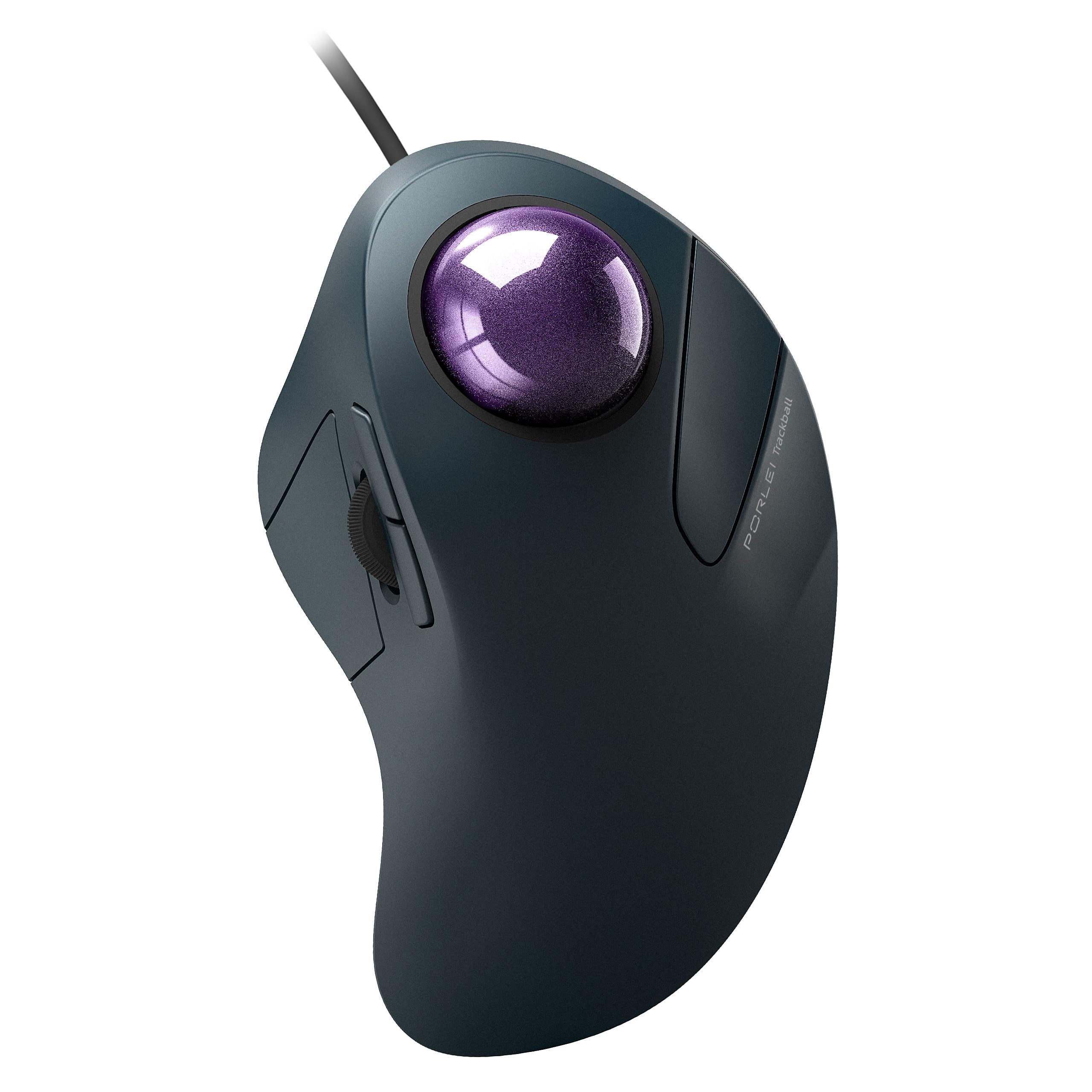
1. PORLEI Wired Trackball Mouse for Large Hands
Our pick — 4.5★ from 450+ verified ratings; the strongest balance of quality and price.
The desk-space saver that keeps your wrist still and your cursor gliding on any surface.
This is the standout pick for anyone whose desk is a disaster zone. Because the 44mm finger-operated trackball does the moving, the mouse body itself never slides — so it works flawlessly on a cluttered desk, a couch cushion, or a bed. That stationary design is also the reason owners with larger hands report real relief, with the palm rest taking pressure off the wrist during long sessions.
You get 5 adjustable DPI levels (400, 800, 1200, 1600, 2400, and 4000) to control how fast the cursor travels, plus a 1.8m cable that reaches comfortably around most setups. It is plug-and-play over USB-A with no drivers needed, though the forward and backward buttons won’t work on Mac systems. The 6-button layout covers the essentials, and the build quality holds up well against pricier alternatives.
What wins people over is the combination of ergonomics and smoothness — the trackball glides freely without the stiction (a sticky start-up lag) that plagues cheaper models. The honest trade-off is that the “soft touch” finish can degrade into a sticky mess over time, so this is best viewed as a high-value daily driver rather than a decades-long investment.
Wrist-Saving Highlights
- Trackball means zero desk movement, ideal for tight workspaces
- 6 buttons with 5 DPI levels for precise cursor control
- Ergonomics is the top praise, with owners citing real wrist-strain relief
The Honest Caveats
- Soft-touch coating can become sticky after long-term use
- Not recommended for gaming due to its tracking profile
Reach for this if: you want a no-movement mouse that fits large hands and frees up desk space.
Look elsewhere if: you need a gaming-grade sensor or a surface that won’t degrade after a year.
2. SANWA Wired Ergonomic Vertical Mouse
The 55° handshake angle that keeps late-night work silent and wrist pain at bay.
The defining feature here is the 55-degree vertical tilt that places your hand in that natural handshake position, a shape designed to reduce muscle tension in the forearm. Buyers report genuine carpal tunnel relief, with one 9-hour daily user noting it “has been very helpful to mitigate pain on my wrist.”
Silent switches on all buttons make it suitable for meetings and shared workspaces. You get 2 adjustable DPI levels (1000 and 1600) to toggle sensitivity, plus 5 buttons total, with the back and forward thumb buttons making web browsing faster. The SANWA software lets you remap buttons and the scroll wheel, but note the forward and backward buttons won’t work on Mac.
The main physical compromise is sizing — at 4.65 inches long and 2.66 inches wide, it’s a medium profile, so those with very large hands might find it snug. While it has fewer DPI levels than the DELUX above, its silent operation and focused ergonomic shape make it a strong mid-range choice for office workers.
Silent relief: The noiseless clicks and 55° angle make this a top pick for quiet offices and wrist-pain sufferers.
The fit note: Ideal for small-to-medium hands; larger hands may want a taller shell.
Best for: anyone needing a quiet, comfortable mouse for marathon work sessions in shared spaces.
Think twice if: you need high-DPI gaming precision or a larger hand profile.
3. DELUX Ergonomic Vertical Mouse M618Plus
A six-year daily driver with a removable wrist rest and vibrant RGB that still flexes for gaming.
This is the mouse that keeps going — owners mention six years of daily use with no wrist or hand pain, even for those with chronic hand weakness. It’s explicitly designed for large hands, with a recommended hand length of 6.7 to 7.5 inches (170-190mm) and hand widths of 3.1 to 3.9 inches (80-100mm), so you know it fits before you buy.
The 6 programmable buttons let you customize left, right, middle, forward, backward, and DPI functions via the driver, with settings stored onboard. You get 6 DPI gears (400-800-1200-1600-2400-4000) switchable at the bottom of the mouse, and the sensor is good enough to double as an ergonomic gaming mouse. The removable palm rest lifts your wrist off the table, and the silent clicks cut sound by more than 90%.
On the specification front, it beats the SANWA above with 6 programmable buttons versus 5, and offers far more DPI range. The vibrant RGB chasing backlight is the aesthetic hook, though it can be switched off with a dedicated button. The trade-off is the 1.6-meter cable, which some owners wish was longer, and with a 210g weight, it’s a substantial presence on the desk.
Why It Endures
- 6 programmable buttons and 6 DPI levels up to 4000 (12800 with driver)
- Removable wrist rest adds cushioned support
- Proven longevity with years of daily-use reports
What To Know
- At 210g, it’s noticeably heavy
- Cable is a modest 1.6 meters
The standout: a feature-dense vertical mouse built for large hands that pulls double duty for work and play.
Who it’s not for: those wanting a light, minimal mouse or a longer cable reach.
4. ELECOM Left Hand Wired USB Ergonomic Mouse

A rare gem built exclusively for lefties, with the primary click on the right side.
Left-handed users have a notoriously thin pickings for ergonomic mice, and this ELECOM EX-G model fills that gap precisely. The shape is sculpted for the left hand, with the left click located on the right side so your index finger does the main work. Customers note it’s “a gem” that doesn’t hurt the hand like a standard mouse would, a real relief after years of adapting to right-handed gear.
It uses a silent switch that eliminates the ticking sound, making it ideal for meetings and night work. The 5 buttons are customizable via ELECOM’s Mouse Assistant software, and the 2000 DPI fixed sensitivity is solid for office work. At just 4.1 ounces (115g) and 3.1 x 4.7 x 2.3 inches, it’s lightweight and easy to move.
The key difference from the right-handed mice elsewhere on this list is the ergonomic angle matched to left-hand use, which helps reduce right-hand overuse from typing and keypad work. The caveat is that it takes about half an hour for your fingers and wrist to adapt to the new angle — some buyers found the transition briefly cramping before their muscles settled in.
Left-hand hero: purpose-built ergonomics for lefties, quiet clicks, and a 2-year warranty.
The adjustment: expect a short learning curve as your hand adapts to the new grip.
Grab this if: you’re left-handed and tired of contorting your hand into right-handed shapes.
skip it if: you need adjustable DPI levels or you’re a right-handed user.
5. Adesso Wired Vertical Ergonomic Illuminated Mouse

The glowing vertical that trades flashy features for proven, long-term wrist relief.
This is the pick for those who want a no-nonsense vertical mouse that simply works. The 6-button design with an adjustable DPI switch (toggle between 1000 and 1600) covers the basics without needing any driver installation. The vertical shape provides the forearm support that minimizes wrist pain from twisting, and the “ice blue” illumination against a glossy black case adds a touch of style.
Where this mouse shines is longevity and pain relief — reviewers point out over 5 years of reliable full-time use with significant relief from repetitive motion pain. The broad contour accommodates a wide range of hand sizes, and the build is durable enough to survive being knocked off a desk. It’s a budget-friendly entry point that gets the ergonomics right.
The recurring gripe is the button stiffness, particularly the middle scroll click, which some owners find requires a firm squeeze. The forward and backward buttons also caused browser freezes for some users on Windows 7. For pure value and wrist relief, it holds its own against pricier options, but if you need soft, easy clicks, consider the SANWA above.
The Long-Term Win
- Proven multi-year reliability with real pain relief
- 6 buttons with easy DPI toggle (1000/1600)
- Accommodates a wide range of hand sizes
The Stiff Truth
- Buttons require noticeable force to click
- Aesthetically cheap-feeling glossy plastic
Best for: budget-focused buyers who want proven ergonomic relief without software fuss.
Not ideal for: those with very large hands or a preference for feather-light button presses.
6. zelotes Wired Gaming Mouse with Joystick

A vertical gaming mouse with a thumb joystick that out-sensors mice twice its price.
This is the wild card of the list — a vertical mouse that’s genuinely built for gaming. The headline feature is the 5-direction joystick controlled by your thumb, which by default maps to the W, A, S, D, and spacebar keys, letting you move in-game without touching the keyboard. The PixArt PMW3325 sensor (also known as the 3325 photoelectric chip) gets praised as unbeatable at this price point.
You get 5-level DPI adjustment (1500, 2500, 4000, 7000, and 10000) to dial in your sensitivity, and a total of 11 programmable buttons that can all be customized via software. Buyers who switched from a Razer report still using it after a year, and it’s often compared favorably to the Logitech MX Vertical for comfort, though it’s taller. The matte plastic finish feels solid, and the LED lights add to the gaming aesthetic.
The honest caveats: the side buttons sit low and forward, requiring a large thumb movement, and the joystick is small but rebindable. It’s also on the heavier side — around 100g even after removing an internal weight — and the stock skates (the pads on the bottom) are mediocre. For pure ergonomic wrist posture during gaming sessions, it beats the standard vertical mice, but the DELUX above is the safer all-rounder if you don’t need the joystick.
The Gamer’s Toolkit
- 5-direction thumb joystick for keyboard-free movement
- 10000 DPI max with a praised PixArt 3325 sensor
- 11 programmable buttons for full customization
The Trade-Offs
- Side buttons are awkwardly placed for reach
- Heavy build with subpar stock skates
Reach for this if: you want gaming-grade precision in a wrist-friendly vertical form.
Look elsewhere if: you prefer simple office ergonomics or a lighter mouse.
7. Contour Unimouse Ergonomic Vertical Mouse
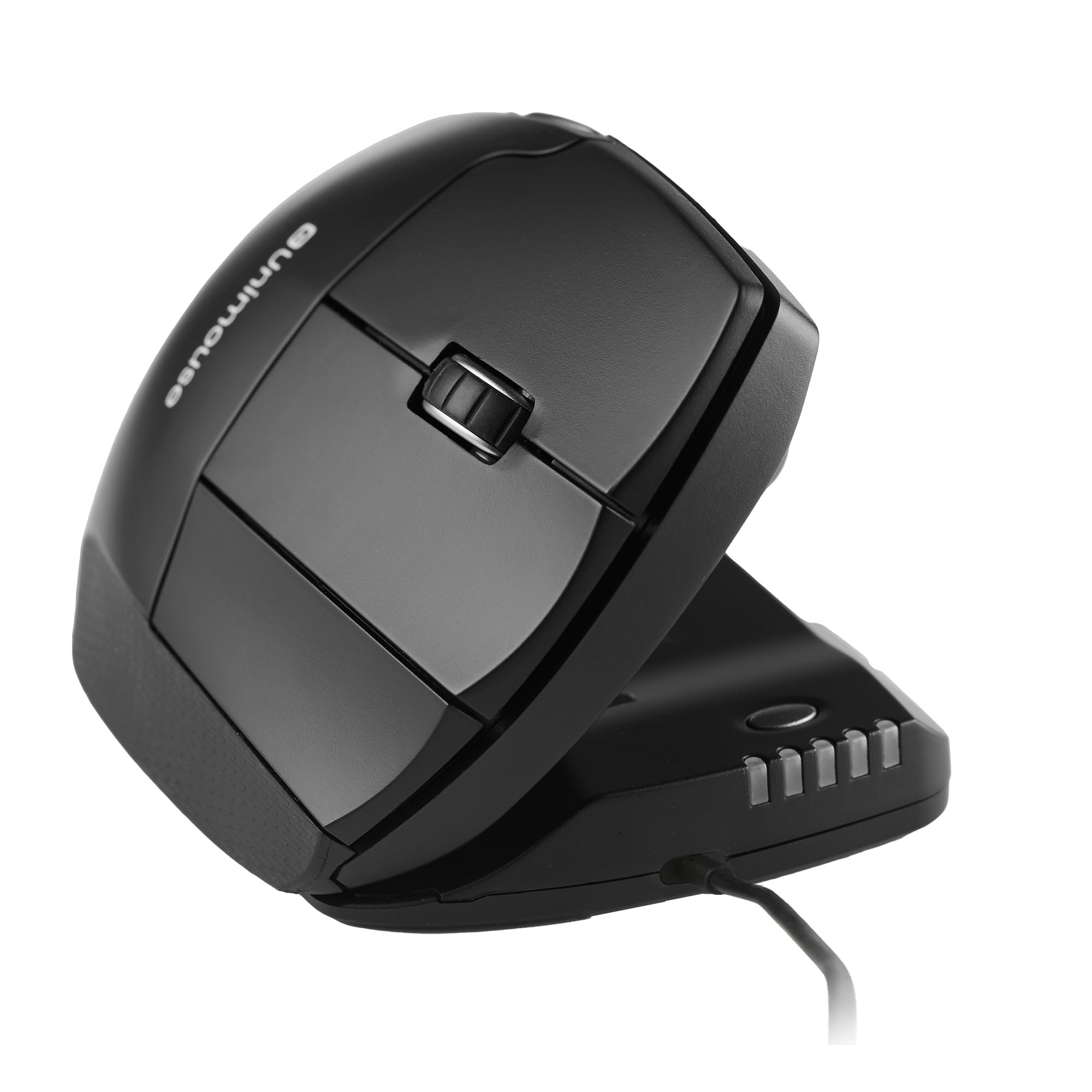
The most adjustable mouse on this list, letting you dial in the exact angle your wrist needs.
This is the premium pick for people who know their old mouse was close but not quite right. Unlike fixed-angle vertical mice that lock you into one position, the Unimouse lets you set the tilt anywhere from 35° to 70° on a sturdy friction hinge. You can also slide, pivot, and rotate the thumb support up, down, in, and out to find a truly custom grip, then adjust it again mid-day as your forearm tires.
It’s a favorite among CAD designers, who praise the dedicated middle button as excellent for rotating models — one buyer bought a second one for work. The 6 programmable buttons and smooth scroll wheel adapt to your workflow, and the wired USB-C connection means no charging, no batteries, just plug in and go. It’s also built with post-consumer recycled plastic for a reduced carbon footprint.
The luxury of adjustability comes at a price, and it’s the most expensive wired option here alongside the Evoluent models. For the right user, the custom fit is worth it, but the Evoluent below has a longer track record for sheer wrist-pain relief.
Your fit, your rules: the 35-70° tilt and 4-way thumb rest make this the ultimate for personalized ergonomics.
The premium cost: a significant investment, and a few owners wanted snappier cursor response.
Best for: CAD designers, digital artists, and anyone who’s never found a fixed-angle mouse comfortable.
Think twice if: you’re on a budget or want the most responsive cursor on the market.
8. Evoluent VM4S Ergonomic Vertical Mouse (Small)

The original vertical mouse that small-handed users swear by for eliminating wrist pain.
Evoluent invented the category, and this VM4S model is purpose-built for smaller hands. The design supports your hand in an upright neutral position, and the feedback is consistently dramatic — Shoppers say wrist swelling and inflammation gone within a week of switching.. The broad bottom lip is a standout feature, keeping your pinky off the desk and preventing that awkward drag.
You get 4 adjustable pointer speeds controlled by side buttons, so you never have to release your grip to change sensitivity. The 6 customizable buttons work with the Evoluent Mouse Manager software on Windows, and it’s compatible with Mac OS and Linux as well. For a “small” mouse, it fits a range of hand sizes, with users from 5’2″ to 5’7″ finding it comfortable.
The most-mentioned aspect is wrist comfort — it’s the single biggest reason people buy it, and it delivers. The honest caveats: the bottom thumb button is poorly placed for some, and there’s a 1-2 week adjustment period where you’ll make accidental clicks., it’s an investment, but for many, the pain relief justifies the price. Size-wise, it’s smaller than the VMDL below, which is the better fit if you have larger hands.
The Relief Factor
- Wrist comfort is the #1 praise, with rapid pain-relief reports
- 4 pointer speeds adjustable without releasing grip
- Broad lip keeps pinky off the desk surface
The Adjustment Cost
- Premium price point
- 1-2 week learning curve with accidental clicks
Reach for this if: you have small-to-medium hands and want the most proven wrist-pain relief available.
pass on it if: you have large hands (opt for the VMDL) or a tight budget.
9. Evoluent VMDL Ergonomic Vertical Mouse (Large)
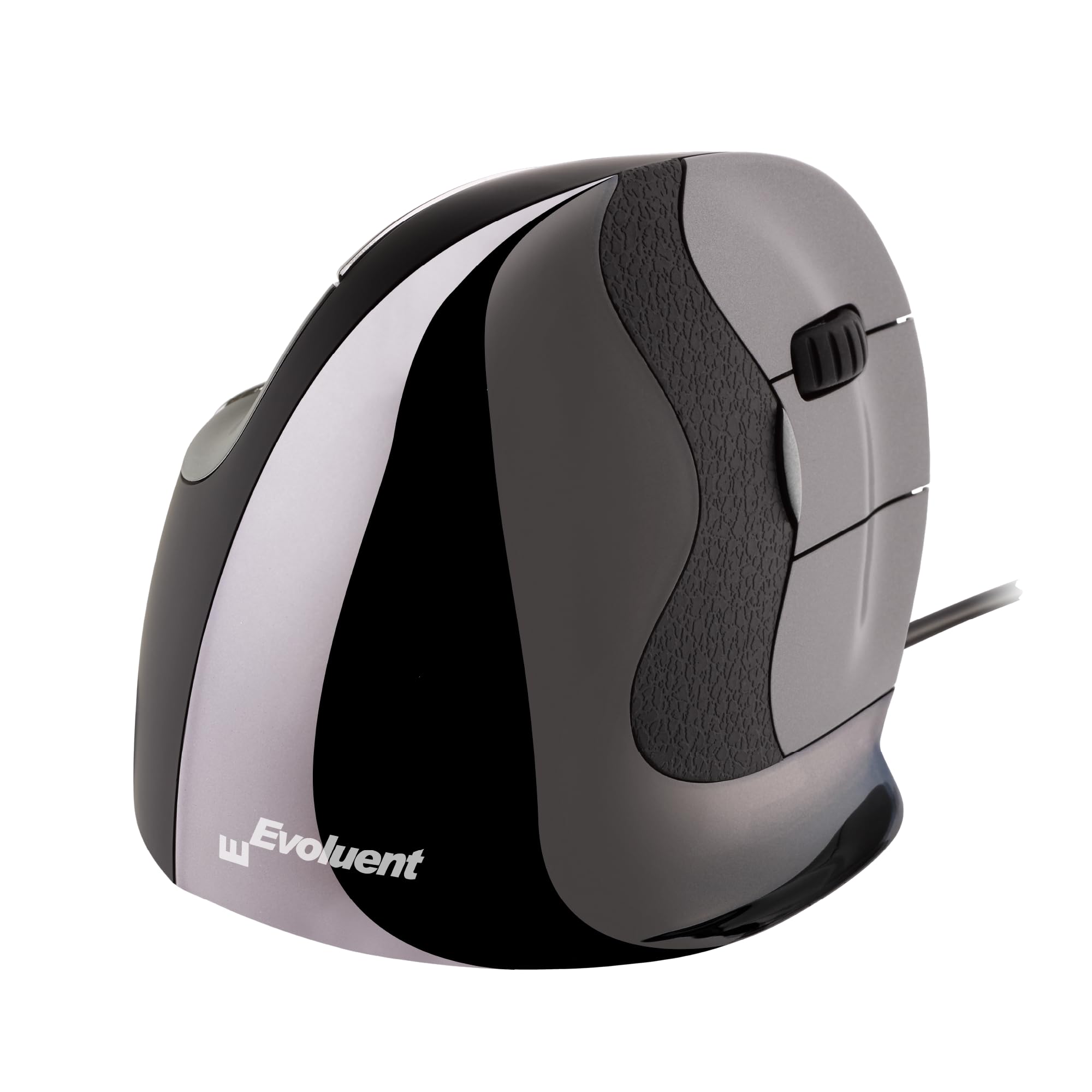
The tallest Evoluent shell yet, built for big hands that need room to stretch.
This is the large-hand version of Evoluent’s iconic vertical design, and it solves a problem many big-handed users face: standard mice are too small, forcing a cramped grip. The taller shell lets your hand rest naturally without cramping, and the expert design — from the inventor of the vertical mouse back in 1994 — has been validated by decades of positive feedback.
Like its smaller sibling, it offers 4 levels of pointer speed via top-mounted buttons, and 6 customizable buttons work with the Evoluent Mouse Manager software on Windows. The pinky support prevents your finger from rubbing against the desk, a small detail that makes a big difference over long sessions. It’s plug-and-play with any USB-compatible system, and the wired connection means instant response — buyers specifically note the wired version avoids the lag they felt with wireless.
Owners with large hands call it the “largest mouse found” and report it fits naturally with no cramping, It effectively reduces carpal tunnel and shoulder pain.. The recurring advice is to keep the pointer speed on the lowest setting for best control. The trade-off is the premium price and the size itself — if you have medium or small hands, the VM4S above is a better match.
Big-hand relief: the tallest Evoluent shell, purpose-built for those who find other mice too small.
The premium investment: a high price for top-tier ergonomics, best for those with serious wrist pain.
Best for: large-handed users who prioritize maximum wrist support and instant wired response.
Not for: small-handed users or those who want a budget-friendly option.
Understanding the Specs
Vertical Angle vs. Trackball
The core decision is if you want a vertical mouse, which tilts your hand into a handshake position, or a trackball, which keeps your hand still while your finger moves the cursor. Vertical mice reduce forearm twisting but require desk space to move. Trackballs work on any surface, including a couch or bed, and are ideal for tiny workspaces. The trade-off is that trackballs take more time to master for precise cursor control.
DPI and Sensor Quality
DPI, or dots per inch, measures how far the cursor travels relative to physical mouse movement. A higher DPI (like 4000 or 10000) means you move the mouse less to cross the screen, which suits large monitors and fast-paced gaming. Lower DPI (around 800-1600) gives finer control for design work. A good optical sensor tracks accurately on various surfaces, while a laser sensor is even more versatile.
FAQ
Will a wired ergonomic mouse work with my Mac laptop?
How long does it take to adjust to a vertical mouse?
Is a trackball mouse better for carpal tunnel than a vertical mouse?
Can I use an ergonomic gaming mouse for office work?
What does the DPI button on the mouse actually do?
Are silent click mice actually quiet?
How do I know if I need a small or large ergonomic mouse?
Is a wired mouse more reliable than a wireless one?
Can I remap the buttons on these ergonomic mice?
How heavy is a typical vertical ergonomic mouse?
Final Thoughts: The Verdict
Across the board, the wired ergonomic mouse winner is the PORLEI Trackball because it solves the two biggest ergonomic problems at once: it fits large hands comfortably and eliminates desk movement entirely, making it perfect for tight workspaces. If you want the quietest clicks and a classic vertical angle, grab the SANWA. And for the ultimate in customizable comfort — whether you’re a CAD designer or have specific wrist needs — the Contour Unimouse is the one to reach for.
How We Picked
We do not accept paid placement. Every pick is matched to a real buyer and a real use-case; we do not hands-on test units.
Sources & Methodology
Specifications: manufacturer listings and product documentation. Review insights: verified customer reviews, as of August 2026. Pricing: not shown on this page (it changes often); check the current price via the retailer link.
As an Amazon Associate, Calories Fit earns from qualifying purchases. This does not affect which products we feature.